Forum Discussion

Excel VBA Shape Rotate makes unwanted Move and Resize to Shape Group.
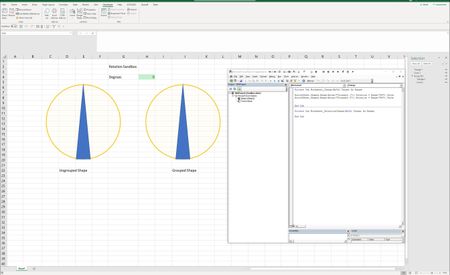

Hi,
I've tried to rotate them, but they both rotate correctly as the screenshot below!
I think there is a bug in your current version of Office, so please make sure you have the latest version of Office 365.
Regards

I am fully updated.
If you look closely at the result image, you will see the image on the right is slightly larger. I am guessing you only entered a value into cell H4 one time. If you enter any value several more times, pressing enter after each entry, I think you will see the changes more clearly.
Also, right click and select size and properties. This should show the same value for height and width for the grouped object. If it does not, then you have replicated my situation.
- Haytham AmairahJun 26, 2019Silver Contributor
Ok, I confirm the issue!
It seems like the grouping causes this weird bug!
You can send feedback to the Excel Team about it.
For now, the workaround is to forget the grouping!
Regards
- GrosnerJun 26, 2019Copper Contributor
Thank you for confirming this issue.
I will provide feedback to Microsoft.
It would be nice if anyone has an actual workaround.
Thanks!
- JKPieterseJun 27, 2019Silver ContributorSome tips to ease sending feedback:
- Use Word (or Powepoint) to get screen-shots (Insert tab on ribbon, Screen-shot drop-down), prior and after the VBA code has run
- Paste the screen-shots in your Excel window
- Also paste a screen-shot of your VBA code in the same Excel window
- Open File, Feedback and click send a frown
- Check the include screen-shot box
