Forum Discussion

Excel VBA - If Sheet Name IsNumeric Loop - False error message
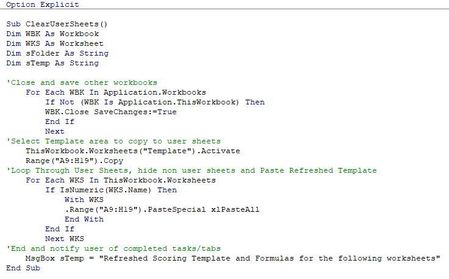
- Aug 24, 2022
Aargh - I should have seen it - my apologies. The line
MsgBox sTemp = "Refreshed Scoring Template and Formulas for the following worksheets"
should be
MsgBox "Refreshed Scoring Template and Formulas"
Or perhaps you wanted something like this:
Sub ClearUserSheets()
    Dim WBK As Workbook
    Dim WKS As Worksheet
    Dim i As Integer
    Dim sFolder As String
    Dim sTemp As String

    'Close and save other workbooks
    For Each WBK In Application.Workbooks
        If Not (WBK Is Application.ThisWorkbook) Then
            WBK.Close SaveChanges:=True
        End If
    Next WBK

    'Select Template area to copy to user sheets
    ThisWorkbook.Worksheets("Template").Activate
    Range("A9:H19").Copy
    'Loop Through User Sheets, hide non user sheets and Paste Refreshed Template
    For Each WKS In ThisWorkbook.Worksheets
        If IsNumeric(WKS.Name) Then
            With WKS
                .Range("A9:H19").PasteSpecial xlPasteAll
                sTemp = sTemp & vbCrLf & .Name
            End With
        End If
    Next WKS

    'End and notify user of completed tasks/tabs
    MsgBox "Refreshed Scoring Template and Formulas for the following worksheets:" & sTemp
End Sub

Attaching a dummy copy here. As this copy lays out there will always be several non-numerically named worksheet tabs. In the real world, there will be 3-5 tabs with text names, and upwards of 15-20 numerically named tabs. Any assistance is appreciated, as always!

Aargh - I should have seen it - my apologies. The line
MsgBox sTemp = "Refreshed Scoring Template and Formulas for the following worksheets"
should be
MsgBox "Refreshed Scoring Template and Formulas"
Or perhaps you wanted something like this:
Sub ClearUserSheets()
    Dim WBK As Workbook
    Dim WKS As Worksheet
    Dim i As Integer
    Dim sFolder As String
    Dim sTemp As String

    'Close and save other workbooks
    For Each WBK In Application.Workbooks
        If Not (WBK Is Application.ThisWorkbook) Then
            WBK.Close SaveChanges:=True
        End If
    Next WBK

    'Select Template area to copy to user sheets
    ThisWorkbook.Worksheets("Template").Activate
    Range("A9:H19").Copy
    'Loop Through User Sheets, hide non user sheets and Paste Refreshed Template
    For Each WKS In ThisWorkbook.Worksheets
        If IsNumeric(WKS.Name) Then
            With WKS
                .Range("A9:H19").PasteSpecial xlPasteAll
                sTemp = sTemp & vbCrLf & .Name
            End With
        End If
    Next WKS

    'End and notify user of completed tasks/tabs
    MsgBox "Refreshed Scoring Template and Formulas for the following worksheets:" & sTemp
End Sub- JoeCavasinAug 24, 2022Brass Contributor
Just for my info - would it be regarded as best practice any time i'm doing a "For Each" operation, to follow it with the "sTemp = sTemp & vbCrLf & (insert next item here)" as a format for the operation?
I see this on another template i use, but still being green to VBA, pretty sure it was copy and paste for an operation that repeats on each worksheet in the book. seeing that structure in both templates makes me think it's a best practice of sorts...
- HansVogelaarAug 24, 2022MVP
There is no generic template for what you should do in a For ... Next loop. It depends on the context.
In this example, we assemble a (potentially) long string in the loop by concatenating it with a line break (vbCrLf) and the item from the loop that we want to display.
But in another example, you might want to do something completely different, for example performing a calculation, or writing a value to a cell.
- JoeCavasinAug 24, 2022Brass Contributorno apologies needed - that worked perfectly! I need to do some research on where and how to appropriately use sTemp, vbCrLf, and how to improve my loops.... can't thank you enough!