Forum Discussion

Excel VBA - Define Range of rows from known static range as start to flexible range address as end
- Mar 06, 2025
Please test this version carefully:
Sub CreateNewUserTab11184()
    Dim WBK As Workbook
    Dim WSH As Worksheet
    Dim RNG1 As Range
    Dim RNG2 As Range
    Dim ADR1 As String
    Dim ADR2 As String
    Dim WSN As Worksheet
    Dim ID As Long
    Dim RowStart As String
    Dim RowEnd As String
    Dim EndAddress As String
    Dim StartAddress As String
    Dim StartMonth As Date
    Dim EndMonth As Date
    Dim StartRow As String
    Dim LR As Long


'Save and close other workbooks
    For Each WBK In Application.Workbooks
        If Not (WBK Is Application.ThisWorkbook) Then
            WBK.Close SaveChanges:=True
        End If
    Next WBK
'Find New Users on Productivity Tab
    Application.ScreenUpdating = True
    Set WBK = ThisWorkbook
    Set WSH = WBK.Worksheets("User List")
    With WSH.Range("F:F")
        Set RNG1 = .Find(What:="No", LookIn:=xlValues, Lookat:=xlWhole)
        If Not RNG1 Is Nothing Then
            Do
                ADR1 = RNG1.Address
                Set RNG2 = RNG1.Offset(0, -5)
                ADR2 = RNG2.Address
                If RNG2.Value <> "" Then
                    ID = RNG2.Value
                    StartMonth = RNG1.Offset(0, 1).Value
            'Copy template to end of sheets
                    WBK.Worksheets("Template").Copy After:=WBK.Worksheets(WBK.Worksheets.Count)
                    Set WSN = WBK.Worksheets(WBK.Worksheets.Count)
            'Update ID Cell and Tab Name on new sheet
                    WSN.Range("B8").Value = ID
                    WSN.Name = CStr(ID)
            'Identify future month rows to remove
                    'WSN.Range("A11") = RowStart
                    If RNG1.Offset(0, 2).Value <> "" Then
                        EndMonth = RNG1.Offset(0, 2).Value
                        EndAddress = Cells(WorksheetFunction.Match(CLng(EndMonth), Range("A:A"), 0), 1).Address
                        RowEnd = Range(EndAddress).Row
                        WSN.Range("A11:A" & RowEnd - 1).EntireRow.Delete
                    End If
            'Identify pre-start month rows to remove
                    StartAddress = Cells(WorksheetFunction.Match(CLng(StartMonth), Range("A:A"), 0), 1).Address
                    RowStart = Range(StartAddress).Row
                    LR = Cells(Rows.Count, 1).End(xlUp).Row
                    WSN.Range("A" & RowStart + 1 & ":A" & LR).EntireRow.Delete
            'Update New Sheet Caluclation References
                    WSN.Range("B1").Formula = "=B9"
                    WSN.Range("B3").Formula = "=SUM(G9,J9,N9)"
                    WSN.Range("B5").Formula = "=Q9"
                    WSN.Range("B9").Formula = "=SUM($AL$11:$AL$33)"
                    WSN.Range("G9").Formula = "=SUM($AO$11:$AO$33)"
                    WSN.Range("J9").Formula = "=SUM($AM$11:$AM$33)"
                    WSN.Range("N9").Formula = "=SUM($AN$11:$AN$33)"
                    WSN.Range("Q9").Formula = "=SUM($AK$11:$AK$21)"
                    WSN.Range("T9").Formula = "=SUM($AI$11:$AI$33)"
                    WSN.Range("Y9").Formula = "=SUM($AH$11:$AH$33)"
                    WSN.Range("AB9").Formula = "=SUM($AJ$11:$AJ$33)"
                    WSN.Range("AH11").Formula = "=COUNTIF($B11:$AF11,""B"")"
                    WSN.Range("AI11").Formula = "=SUMPRODUCT(VALUE($AR11:$BV11))"
                    WSN.Range("AJ11").Formula = "=COUNTIF($B11:$AF11,""=""&""J"")"
                    WSN.Range("AK11").Formula = "=COUNTIF($DD11:$EH11,""=""&""1"")"
                    WSN.Range("AL11").Formula = "=COUNTIF($EJ11:$FN11,""=""&""1"")"
                    WSN.Range("AM11").Formula = "=SUM(FP11:GT11)"
                    WSN.Range("AN11").Formula = "=SUM(IB11:JF11)"
                    WSN.Range("AO11").Formula = "=SUM(GV11:HZ11)"
                    WSN.Range("AK23").Formula = "=IF(AND(SUM($DD23:$EH23)>0,SUM($AK11:$AK21)=0),0,SUM($DD23:$EH23))"
                    WSN.Range("AM23").Formula = "=IF(AND(SUM(FP23:GT23)>0,SUM(AM11:AO21)=0),0,SUM(FP23:GT23))"
                    WSN.Range("AN23").Formula = "=IF(AND(SUM(IB23:JF23)>0,SUM(AM11:AO21)=0),0,SUM(IB23:JF23))"
                    WSN.Range("AO23").Formula = "=IF(AND(SUM(GV23:HZ23)>0,SUM(AM11:AO21)=0),0,SUM(GV23:HZ23))"
                    WSN.Rows("35:36").EntireRow.Copy
                    WSN.Rows("35:36").EntireRow.PasteSpecial xlPasteValues
            'Update User List to create links to newly created user tabs
                    WSH.Hyperlinks.Add Anchor:=RNG2, Address:="", SubAddress:="'" & WSN.Name & "'!A1"
                End If
                'RNG1.Value = "Yes"
                Set RNG1 = .Find(What:="No", Lookat:=xlWhole)
                If RNG1 Is Nothing Then Exit Do
            Loop Until RNG1.Address = ADR1
        End If
    End With
    WSH.Activate
    Application.CutCopyMode = False
    Application.ScreenUpdating = True
End Sub


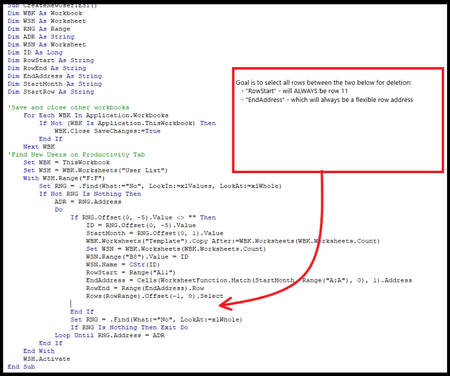
Hey HansVogelaar - something recently broke and i can't understand what happened despite a full day of digging. I'm attaching a copy of it here for check over as time allows. The error only occurs when running the "Create New User Tab" macro. It starts off fine, duplicates the template tab, renames it to the appropriate new employee ID number, but when it attempts to find the starting month row - to remove rows above and below - it then deletes the value in the starting month cell, and errors as a WorksheetFunction.Match error. Tab 121212 shows the result of the successful portion of the create new macro, to the point of error. Any assistance is appreciated, this is definitely beyond my skillset.
- JoeCavasinMar 06, 2025Brass Contributor
Attempt 2.
- HansVogelaarMar 06, 2025MVP
Please test this version carefully:
Sub CreateNewUserTab11184() Dim WBK As Workbook Dim WSH As Worksheet Dim RNG1 As Range Dim RNG2 As Range Dim ADR1 As String Dim ADR2 As String Dim WSN As Worksheet Dim ID As Long Dim RowStart As String Dim RowEnd As String Dim EndAddress As String Dim StartAddress As String Dim StartMonth As Date Dim EndMonth As Date Dim StartRow As String Dim LR As Long 'Save and close other workbooks For Each WBK In Application.Workbooks If Not (WBK Is Application.ThisWorkbook) Then WBK.Close SaveChanges:=True End If Next WBK 'Find New Users on Productivity Tab Application.ScreenUpdating = True Set WBK = ThisWorkbook Set WSH = WBK.Worksheets("User List") With WSH.Range("F:F") Set RNG1 = .Find(What:="No", LookIn:=xlValues, Lookat:=xlWhole) If Not RNG1 Is Nothing Then Do ADR1 = RNG1.Address Set RNG2 = RNG1.Offset(0, -5) ADR2 = RNG2.Address If RNG2.Value <> "" Then ID = RNG2.Value StartMonth = RNG1.Offset(0, 1).Value 'Copy template to end of sheets WBK.Worksheets("Template").Copy After:=WBK.Worksheets(WBK.Worksheets.Count) Set WSN = WBK.Worksheets(WBK.Worksheets.Count) 'Update ID Cell and Tab Name on new sheet WSN.Range("B8").Value = ID WSN.Name = CStr(ID) 'Identify future month rows to remove 'WSN.Range("A11") = RowStart If RNG1.Offset(0, 2).Value <> "" Then EndMonth = RNG1.Offset(0, 2).Value EndAddress = Cells(WorksheetFunction.Match(CLng(EndMonth), Range("A:A"), 0), 1).Address RowEnd = Range(EndAddress).Row WSN.Range("A11:A" & RowEnd - 1).EntireRow.Delete End If 'Identify pre-start month rows to remove StartAddress = Cells(WorksheetFunction.Match(CLng(StartMonth), Range("A:A"), 0), 1).Address RowStart = Range(StartAddress).Row LR = Cells(Rows.Count, 1).End(xlUp).Row WSN.Range("A" & RowStart + 1 & ":A" & LR).EntireRow.Delete 'Update New Sheet Caluclation References WSN.Range("B1").Formula = "=B9" WSN.Range("B3").Formula = "=SUM(G9,J9,N9)" WSN.Range("B5").Formula = "=Q9" WSN.Range("B9").Formula = "=SUM($AL$11:$AL$33)" WSN.Range("G9").Formula = "=SUM($AO$11:$AO$33)" WSN.Range("J9").Formula = "=SUM($AM$11:$AM$33)" WSN.Range("N9").Formula = "=SUM($AN$11:$AN$33)" WSN.Range("Q9").Formula = "=SUM($AK$11:$AK$21)" WSN.Range("T9").Formula = "=SUM($AI$11:$AI$33)" WSN.Range("Y9").Formula = "=SUM($AH$11:$AH$33)" WSN.Range("AB9").Formula = "=SUM($AJ$11:$AJ$33)" WSN.Range("AH11").Formula = "=COUNTIF($B11:$AF11,""B"")" WSN.Range("AI11").Formula = "=SUMPRODUCT(VALUE($AR11:$BV11))" WSN.Range("AJ11").Formula = "=COUNTIF($B11:$AF11,""=""&""J"")" WSN.Range("AK11").Formula = "=COUNTIF($DD11:$EH11,""=""&""1"")" WSN.Range("AL11").Formula = "=COUNTIF($EJ11:$FN11,""=""&""1"")" WSN.Range("AM11").Formula = "=SUM(FP11:GT11)" WSN.Range("AN11").Formula = "=SUM(IB11:JF11)" WSN.Range("AO11").Formula = "=SUM(GV11:HZ11)" WSN.Range("AK23").Formula = "=IF(AND(SUM($DD23:$EH23)>0,SUM($AK11:$AK21)=0),0,SUM($DD23:$EH23))" WSN.Range("AM23").Formula = "=IF(AND(SUM(FP23:GT23)>0,SUM(AM11:AO21)=0),0,SUM(FP23:GT23))" WSN.Range("AN23").Formula = "=IF(AND(SUM(IB23:JF23)>0,SUM(AM11:AO21)=0),0,SUM(IB23:JF23))" WSN.Range("AO23").Formula = "=IF(AND(SUM(GV23:HZ23)>0,SUM(AM11:AO21)=0),0,SUM(GV23:HZ23))" WSN.Rows("35:36").EntireRow.Copy WSN.Rows("35:36").EntireRow.PasteSpecial xlPasteValues 'Update User List to create links to newly created user tabs WSH.Hyperlinks.Add Anchor:=RNG2, Address:="", SubAddress:="'" & WSN.Name & "'!A1" End If 'RNG1.Value = "Yes" Set RNG1 = .Find(What:="No", Lookat:=xlWhole) If RNG1 Is Nothing Then Exit Do Loop Until RNG1.Address = ADR1 End If End With WSH.Activate Application.CutCopyMode = False Application.ScreenUpdating = True End Sub- JoeCavasinMar 11, 2025Brass Contributor
Tagging on to the thread for this workbook, though a different macro. The above solution worked beautifully, btw, for the Create New user routine.
The new item discovered is in the remove user tab routine. The original remove user code included looking at user list range H:H for "****-**" as a starting point, however further review and test by several users highlighted the fact users input various date formats, and using wildcard "YYYY-MM" isn't exactly the same as evaluating whether a given cell's value is a date. My attempt below is to use the IsDate function to evaluate column H:H for any date value. So far this attempt is not erroring, however it is also not removing the user tab with an end month populated. what am i missing?
Option Explicit
Sub DEVRemoveUserCCCCC()
Dim WBK As Workbook
Dim WKS As Worksheet
Dim RNG As Range
Dim ADR As String
Dim RWS As Worksheet
Dim RID As String
Dim eMonth As Range
Dim sTemp As String
Dim ToPath As String
sTemp = "Deleted user tabs for the following users departing the team: "
'Save and close other workbooks
For Each WBK In Application.Workbooks
If Not (WBK Is Application.ThisWorkbook) Then
WBK.Close SaveChanges:=True
End If
Next WBK
'Find Users leaving team from - end month denotes when user will leave
Application.DisplayAlerts = False
Set WBK = ThisWorkbook
Set WKS = WBK.Worksheets("User List")
With WKS.Range("H2:H50")
Set eMonth = .Find(What:="*", LookIn:=xlValues, Lookat:=xlWhole)
If eMonth = IsDate(eMonth) Then
ADR = eMonth.Address
Do
If eMonth.Offset(0, -7).Value <> "" Then
RID = eMonth.Offset(0, -7).Value
Set RWS = ThisWorkbook.Worksheets(RID)
RWS.PageSetup.PrintArea = "$A$8:$AF$36"
sTemp = sTemp & vbCrLf & "*" & RWS.Name
RWS.ExportAsFixedFormat xlTypePDF, Filename:=ToPath & "EID " & RWS.Range("B8").Value & " - Final Attendance Record.pdf", IgnorePrintAreas:=False, OpenAfterPublish:=True
RWS.Delete
Range(ADR).EntireRow.Delete
End If
Set eMonth = .Find(What:="*", LookIn:=xlValues, Lookat:=xlWhole, SearchDirection:=xlNext)
If eMonth Is Nothing Then Exit Do
Loop Until IsEmpty(eMonth)
End If
End With
WBK.Save
MsgBox sTemp
End Sub
- HansVogelaarMar 06, 2025MVP
You didn't attach a workbook.