Forum Discussion

Excel updates causing performance issues?

Pleae check below setting:
File-->Options-->Advanced. On the right panel scroll down to formula and make sure "Enable multi-threaded calculation" is checked. I have uploaded a SS to show where the option is.
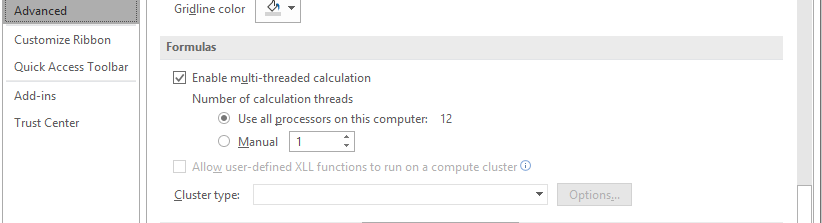

I appreciate the reply. Yes, I always keep the "enable multi-threaded calculation" feature on and use all processors on the computer (e.g. 8). Based on several tests, my gut feeling is that there is something in the Excel source code that changed the way multi-threaded logic works with system resources that can significantly impact performance. It's beyond my capabilities so hoping there is someone out there with Microsoft code knowledge that can interpret what changed with the software update within the last two days so it can be restored or re-optimized.
- KatyPlannerSep 19, 2020Copper Contributor
Just providing an update to my question earlier this week ... After a large automatic Microsoft Windows and/or Office update today, my Excel performance is now back to where it was earlier this week and even slightly better than it was before. Thanks to the Microsoft folks!