Forum Discussion

clieboff
Nov 06, 2021Copper Contributor
Excel transpose and merge
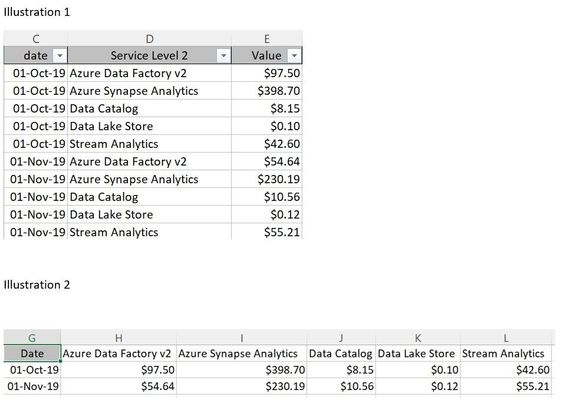
Does anyone know a function or method in excel of getting data in a state from Illustration 1 to Illustration 2. Transform could be part of the solution but I need a way to consolidate rows and colum...

Riny_van_Eekelen
Nov 06, 2021Platinum Contributor
clieboff How about a pivot table? See attached.

phraingck
Mar 26, 2023Copper Contributor
This is exactly what I was looking for to do!
Two columns with about 850 rows of data, VoterID and the Dates they voted in the last 5 elections. (Voter and Date columns.) The trick was to copy the VoterID and rename it Values, then rearrange columns such that I had VoterID in column A, Dates in column B and Values in column C (a copy of column A).
After creating a Table, I used Pivot using your "sample.xlsx" spreadsheet as an example.
I'm a slow learner, but I eventually got what I needed. Thank you so much for your help and patience!
- phraingckMar 26, 2023Copper ContributorMake that your "sampledata.xlsx" spreadsheet.