Forum Discussion

Excel Table format change
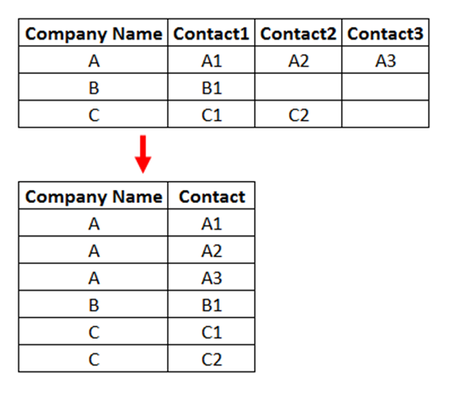
- Jun 19, 2024
You can use Power Query for this.
Click anywhere in the table.
On the Data tab of the ribbon, in the Get & Transform Data group, click From Table/Range.
In the Power Query Editor, activate the Transform tab of the ribbon.
Click the drop-down arrow on the right of Unpivot Columns, and select Unpivot Other Columns.
Select the Attribute column, right-click in it and select Remove from the context menu.
Double-click Value and change it to Contact.
Activate the Home tab of the ribbon.
Click Close & Load > Close & Load to..., and select a destination.

You can use Power Query for this.
Click anywhere in the table.
On the Data tab of the ribbon, in the Get & Transform Data group, click From Table/Range.
In the Power Query Editor, activate the Transform tab of the ribbon.
Click the drop-down arrow on the right of Unpivot Columns, and select Unpivot Other Columns.
Select the Attribute column, right-click in it and select Remove from the context menu.
Double-click Value and change it to Contact.
Activate the Home tab of the ribbon.
Click Close & Load > Close & Load to..., and select a destination.

Thank you so much for your very clear and useful answer.
Best regards,
Joaquim