Forum Discussion

Jack Glass
Aug 06, 2018Copper Contributor
Excel Sum
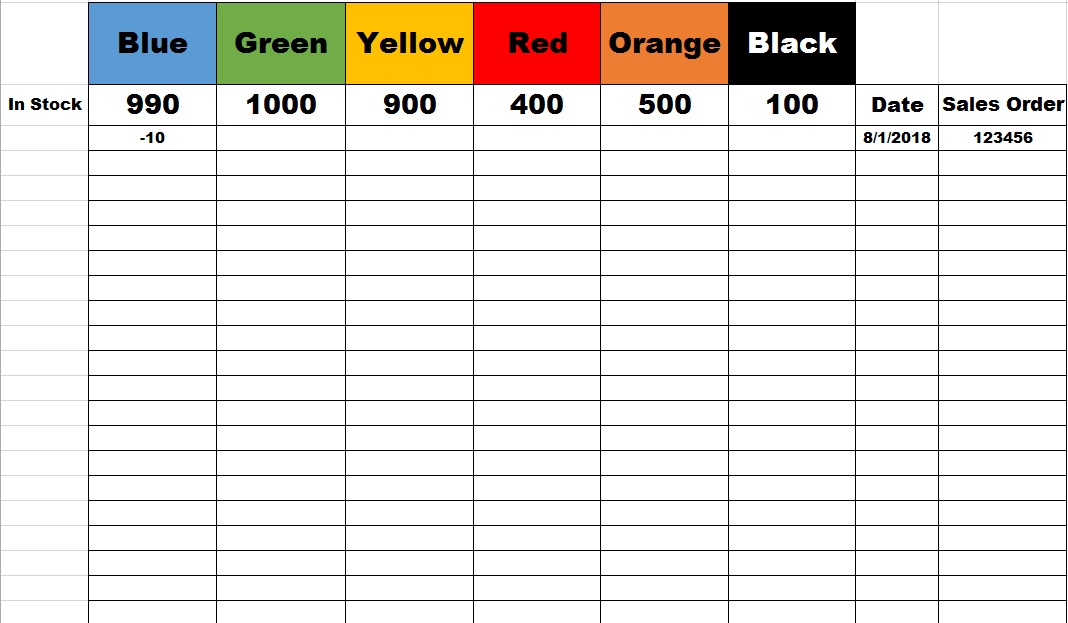
Hello all I would like to sum the total of a column but display the total at the top of the column instead of the bottom as shown in the picture. I want to start with the number shown in the top...
- Aug 06, 2018
Hi Jack,
If your "blue" 990 is in B3 you may use for B3 something like
=990+SUM(B4:B100)
or which range you have. If B3 is variable, you may change them in a helper sheet and use
=Sheet2!B3+SUM(B4:B100)

SergeiBaklan
Aug 06, 2018Diamond Contributor
Hi Jack,
If your "blue" 990 is in B3 you may use for B3 something like
=990+SUM(B4:B100)
or which range you have. If B3 is variable, you may change them in a helper sheet and use
=Sheet2!B3+SUM(B4:B100)

PennyH
Jun 04, 2019Copper Contributor
Hi There
Similar question really but I think more straightforward:
How do you simply get the SUM row to show at the top of the sheet, instead of at the bottom?
I'm adding values below, across several columns and need to see total for each as I go. Panes already frozen to see list on right and top row choices.
Hope that makes sense...!
Thank you
Penny.