Forum Discussion

Jack Glass
Aug 06, 2018Copper Contributor
Excel Sum
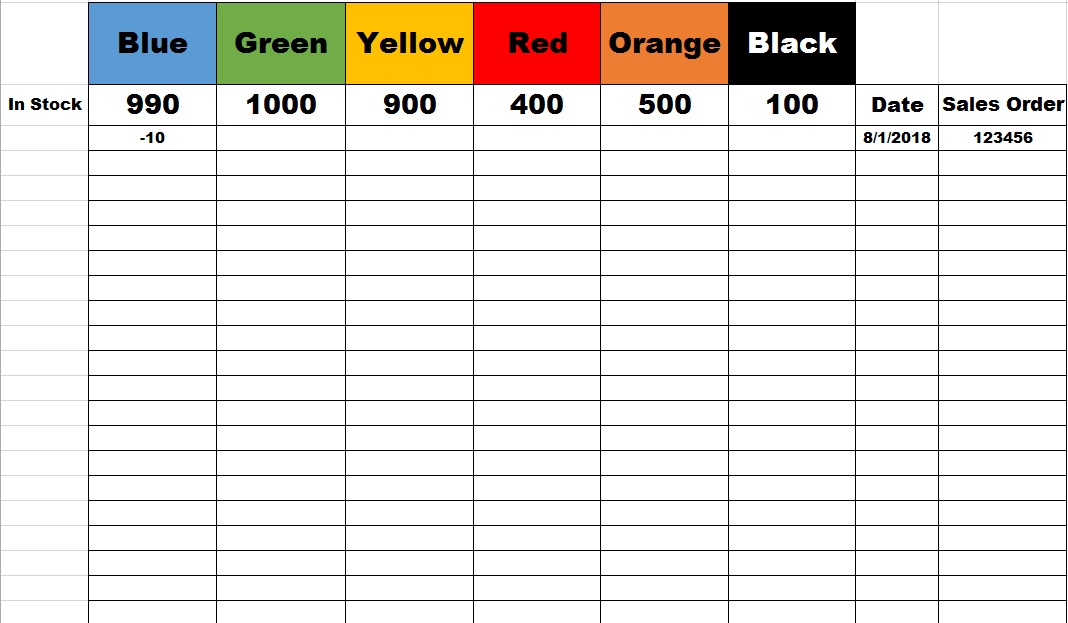
Hello all I would like to sum the total of a column but display the total at the top of the column instead of the bottom as shown in the picture. I want to start with the number shown in the top...
- Aug 06, 2018
Hi Jack,
If your "blue" 990 is in B3 you may use for B3 something like
=990+SUM(B4:B100)
or which range you have. If B3 is variable, you may change them in a helper sheet and use
=Sheet2!B3+SUM(B4:B100)

Jack Glass
Aug 07, 2018Copper Contributor
Thank you very much. Work perfectly.

SergeiBaklan
Aug 07, 2018Diamond Contributor
You are welcome