Forum Discussion

Lomsona
Aug 27, 2022Copper Contributor
Excel sum problem
Hi guys, I need a help, I want to sum cells in same columns like in picture which I added. Left side is done manually by me with auto sum function and is it possible to sum automatically all sums at...
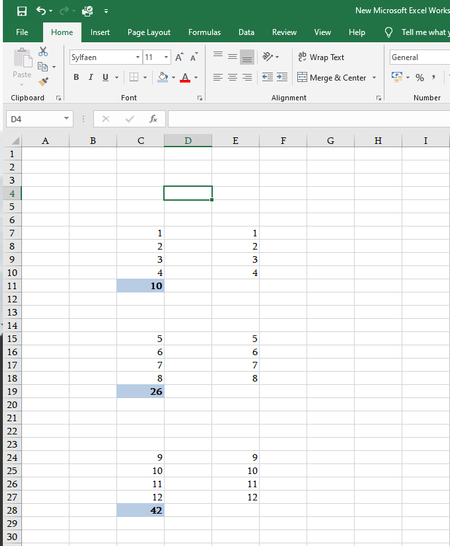
- Aug 27, 2022
Lomsona Alternatively, select the entire column E. Press F5, then Special... and Constants and OK. Now press AutoSum.


Lomsona
Aug 27, 2022Copper Contributor
Thank you, there are a lot of data in one column and its take a lot of time to sum with AutoSum each of them, I`m interesting if there is some formula or function to do it with one click and not to sum each one manually.

HansVogelaar
Aug 27, 2022MVP
Try this macro, and please test thoroughly. It doesn't handle all situations, so let me know if and how it fails.
Sub CreateSum()
    Dim rngConstants As Range
    Dim rngFormulas As Range
    Dim rngTotal As Range
    Dim rng As Range
    On Error Resume Next
    Set rngConstants = ActiveSheet.Cells.SpecialCells(xlCellTypeConstants)
    Set rngFormulas = ActiveSheet.Cells.SpecialCells(xlCellTypeFormulas)
    On Error GoTo 0
    If rngConstants Is Nothing Then
        If rngFormulas Is Nothing Then
            Exit Sub
        Else
            Set rngTotal = rngFormulas
        End If
    ElseIf rngFormulas Is Nothing Then
        Set rngTotal = rngConstants
    Else
        Set rngTotal = Union(rngConstants, rngFormulas)
    End If
    Application.ScreenUpdating = False
    Application.Calculation = xlCalculationManual
    For Each rng In rngTotal.Areas
        If Not rng.Cells(rng.Count).HasFormula Then
            rng.Cells(1).Offset(rng.Rows.Count).Formula = "=SUM(" & rng.Address & ")"
        End If
    Next rng
    Application.Calculation = xlCalculationAutomatic
    Application.ScreenUpdating = True
End Sub
- LomsonaAug 27, 2022Copper ContributorThank you, and I`ll give you feedback.
- Riny_van_EekelenAug 27, 2022Platinum Contributor
Lomsona Alternatively, select the entire column E. Press F5, then Special... and Constants and OK. Now press AutoSum.
- LomsonaAug 27, 2022Copper ContributorThank you very much, that is what I was watching for.