Forum Discussion

ArnaudL360
May 29, 2024Copper Contributor
Excel sum functions
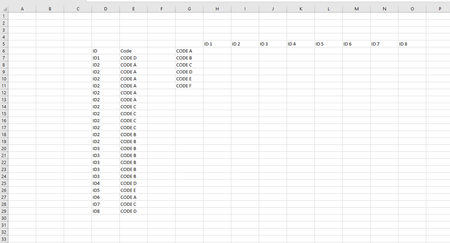
Hello everyone, I need to make a counting table using datas from an other table like shown in the picture under. I've tried NB SI ENS formulas with for exemple : =NB si ens ($D$6:$D$29;H5=D7; $E$...
 May 29, 2024
=NB.SI.ENS($D$7:$D$29;H$5;$E$7:$E$29;$G6)
This formula works in the attached sample file. Please note that the IDs in the file are always entered without a space for example ID1 in cell H5. In your screenshot there is for example ID 1 in cell H5 which wouldn't work because it doesn't match the entries in column D (ID column).
OliverScheurich
May 29, 2024Gold Contributor
=NB.SI.ENS($D$7:$D$29;H$5;$E$7:$E$29;$G6)
This formula works in the attached sample file. Please note that the IDs in the file are always entered without a space for example ID1 in cell H5. In your screenshot there is for example ID 1 in cell H5 which wouldn't work because it doesn't match the entries in column D (ID column).
 ArnaudL360May 29, 2024Copper ContributorThank you very much for your answer, it works perfectly.
Have a good day