Forum Discussion

Excel Sort Script does not work
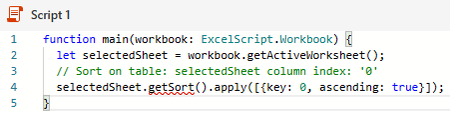
- Jul 18, 2021
getTable appears to be the appropriate method. However, they do not say if Table IDs starts at 0 or 1, I suspect 0 though
EDIT: Assuming the 2nd example on Combine data from multiple Excel tables into a single table works, the line of code:
const headerValues = workbook.getWorksheet(sheetNames[0]).getTables()[0]....
confirms Worksheets and Tables index start at 0
Could you try:
function main(workbook: ExcelScript.Workbook) {
  let selectedSheet = workbook.getActiveWorksheet();

  // Get 1st Table on selectedSheet
  let firstTable = selectedSheet.getTable(0);
  firstTable.getSort().apply([{ key: 0, ascending: true }]);
}
And instead of by ID, by your Table name:
function main(workbook: ExcelScript.Workbook) {
  let selectedSheet = workbook.getActiveWorksheet();

  // Get Table 'Clients' on selectedSheet
  let myTable = selectedSheet.getTable('Clients');
  myTable.getSort().apply([{ key: 0, ascending: true }]);
}
If any option fails and you get an error message please provide that exact message
If the 1st (by ID = 0) works I would suggest you use that one so this will still work if you rename the Table later
EDIT There appears to be an Office Script space on stackoverflow

Thank you for the ideas. I tried both of them. However, because they create a table, they conflict with my table that I already have there.
I realised I failed to mention the present of the table. Is there some quick code adjustments that could be made for a table?

I realised I failed to mention the present of the table
At least you know for next times you should provide the complete picture 🙂
Is there some quick code adjustments that could be made for a table?
Well, as I said, I can't do TypeScript and what I posted is only the result of some readings. I'll read again to try to help you... In the meantime could you provide:
1) The name of the existing Table on your sheet
2) Do you have, or plan to have, more than 1 Table in your sheet
- J_Taylor40Jul 18, 2021Copper ContributorThe name of the table is "Clients". No, I don't plan to have more than one table in the sheet.
- LorenzoJul 18, 2021Silver Contributor
getTable appears to be the appropriate method. However, they do not say if Table IDs starts at 0 or 1, I suspect 0 though
EDIT: Assuming the 2nd example on Combine data from multiple Excel tables into a single table works, the line of code:
const headerValues = workbook.getWorksheet(sheetNames[0]).getTables()[0]....
confirms Worksheets and Tables index start at 0
Could you try:
function main(workbook: ExcelScript.Workbook) {
  let selectedSheet = workbook.getActiveWorksheet();

  // Get 1st Table on selectedSheet
  let firstTable = selectedSheet.getTable(0);
  firstTable.getSort().apply([{ key: 0, ascending: true }]);
}
And instead of by ID, by your Table name:
function main(workbook: ExcelScript.Workbook) {
  let selectedSheet = workbook.getActiveWorksheet();

  // Get Table 'Clients' on selectedSheet
  let myTable = selectedSheet.getTable('Clients');
  myTable.getSort().apply([{ key: 0, ascending: true }]);
}
If any option fails and you get an error message please provide that exact message
If the 1st (by ID = 0) works I would suggest you use that one so this will still work if you rename the Table later
EDIT There appears to be an Office Script space on stackoverflow
- J_Taylor40Jul 19, 2021Copper ContributorI tried the second one and it works.
Thank you so much, L z.