Forum Discussion

Excel Sort Script does not work
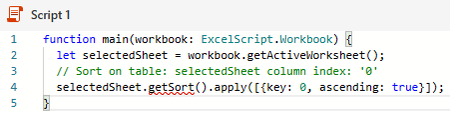
- Jul 18, 2021
getTable appears to be the appropriate method. However, they do not say if Table IDs starts at 0 or 1, I suspect 0 though
EDIT: Assuming the 2nd example on Combine data from multiple Excel tables into a single table works, the line of code:
const headerValues = workbook.getWorksheet(sheetNames[0]).getTables()[0]....
confirms Worksheets and Tables index start at 0
Could you try:
function main(workbook: ExcelScript.Workbook) {
  let selectedSheet = workbook.getActiveWorksheet();

  // Get 1st Table on selectedSheet
  let firstTable = selectedSheet.getTable(0);
  firstTable.getSort().apply([{ key: 0, ascending: true }]);
}
And instead of by ID, by your Table name:
function main(workbook: ExcelScript.Workbook) {
  let selectedSheet = workbook.getActiveWorksheet();

  // Get Table 'Clients' on selectedSheet
  let myTable = selectedSheet.getTable('Clients');
  myTable.getSort().apply([{ key: 0, ascending: true }]);
}
If any option fails and you get an error message please provide that exact message
If the 1st (by ID = 0) works I would suggest you use that one so this will still work if you rename the Table later
EDIT There appears to be an Office Script space on stackoverflow

Hi J_Taylor40
Never did Office scripting and can't with my 365 subscription so don't expect too much
Looking at the script you posted I was under the impression that a range object (seems to be called 'interface') was missing. After some readings I found the following example here:
function main(workbook: ExcelScript.Workbook) {
  // Get the current worksheet.
  let selectedSheet = workbook.getActiveWorksheet();

  // Create a table with the used cells.
  let usedRange = selectedSheet.getUsedRange();
  let newTable = selectedSheet.addTable(usedRange, true);

  // Sort the table using the first column.
  newTable.getSort().apply([{ key: 0, ascending: true }]);
}
Obviously this does what you want but this script "takes" all the cells used in the sheet
So, if the range you want to sort is actually, say B2:D10, I would suspect you would need to do something like:
function main(workbook: ExcelScript.Workbook) {
  let selectedSheet = workbook.getActiveWorksheet();
  let myRange = selectedSheet.getRange("B2:D10");
  let newTable = selectedSheet.addTable(myRange, true);
  newTable.getSort().apply([{ key: 0, ascending: true }]);
}
Hope this helps & whatever the result is please provide feedback (can help others) - Thanks & nice day...

Thank you for the ideas. I tried both of them. However, because they create a table, they conflict with my table that I already have there.
I realised I failed to mention the present of the table. Is there some quick code adjustments that could be made for a table?
- LorenzoJul 18, 2021Silver Contributor
I realised I failed to mention the present of the table
At least you know for next times you should provide the complete picture 🙂
Is there some quick code adjustments that could be made for a table?
Well, as I said, I can't do TypeScript and what I posted is only the result of some readings. I'll read again to try to help you... In the meantime could you provide:
1) The name of the existing Table on your sheet
2) Do you have, or plan to have, more than 1 Table in your sheet
- J_Taylor40Jul 18, 2021Copper ContributorThe name of the table is "Clients". No, I don't plan to have more than one table in the sheet.
- LorenzoJul 18, 2021Silver Contributor
getTable appears to be the appropriate method. However, they do not say if Table IDs starts at 0 or 1, I suspect 0 though
EDIT: Assuming the 2nd example on Combine data from multiple Excel tables into a single table works, the line of code:
const headerValues = workbook.getWorksheet(sheetNames[0]).getTables()[0]....
confirms Worksheets and Tables index start at 0
Could you try:
function main(workbook: ExcelScript.Workbook) {
  let selectedSheet = workbook.getActiveWorksheet();

  // Get 1st Table on selectedSheet
  let firstTable = selectedSheet.getTable(0);
  firstTable.getSort().apply([{ key: 0, ascending: true }]);
}
And instead of by ID, by your Table name:
function main(workbook: ExcelScript.Workbook) {
  let selectedSheet = workbook.getActiveWorksheet();

  // Get Table 'Clients' on selectedSheet
  let myTable = selectedSheet.getTable('Clients');
  myTable.getSort().apply([{ key: 0, ascending: true }]);
}
If any option fails and you get an error message please provide that exact message
If the 1st (by ID = 0) works I would suggest you use that one so this will still work if you rename the Table later
EDIT There appears to be an Office Script space on stackoverflow