Forum Discussion

rg1008
Mar 08, 2020Copper Contributor
Excel Search Text String from List within Cell and output found text
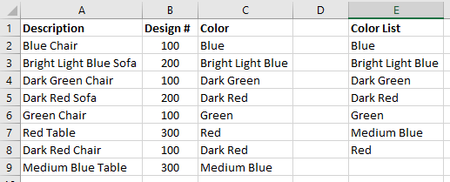
Hello, I have a list of product descriptions (Column A) that contain the color and product type. I'm trying to separate the color into another column (Column C) so that I can sort by Design # (Co...

Riny_van_Eekelen
Mar 08, 2020Platinum Contributor
rg1008 Attached something based on what I recently created in another topic in this forum. I believe it will work for you. Just make sure you enter your colours in the "keyword"-list (Named Range) in the correct order. Enter all the variations first, then just the "single colour". Have a look at the file and you'll understand.
Let me know if you need more help.

MichaelSedlock
May 04, 2021Copper Contributor
Riny,
Thank you, this is an awesome solution. Helped me get exactly what we needed.
For those who may not know, to edit the "Keywords" click on Formulas, Name Manager. There you will see the "Keyword" list defined.
Best Regards,
Thank you, this is an awesome solution. Helped me get exactly what we needed.
For those who may not know, to edit the "Keywords" click on Formulas, Name Manager. There you will see the "Keyword" list defined.
Best Regards,