Forum Discussion

excel search for characters not listed in rows above
- Aug 21, 2023
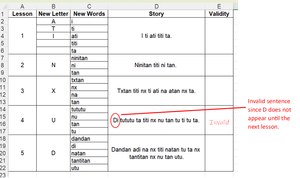
intliteracylinguist so that original example/sheet image was showing merged cells which cause lots of problems. Also having varying number of rows per group causes a bit of complexity. The following formula works but is extra complicated because of that and assumes a max of 10 rows for the last added letter group:
=LET(letters,$B$2:INDEX(B:B,IFERROR(XMATCH(A2+1,A:A),ROW(A2)+10)-1),
  IF(TRIM(CONCAT(TEXTSPLIT(D2,FILTER(letters,LEN(letters)>0,""),,FALSE,1)))="",
     "Valid",
     "InValid"))
in the attached is both merged table and unmerged. In the unmerged you can more easily copy and paste the formula down but you can't on the merged


Unmerge the cells in column E.
Enter the following formula in E2:
=IF(A2="", "", LET(sentence, SUBSTITUTE(D2, " ", ""), length, LEN(sentence), used, MID(sentence, SEQUENCE(length), 1), last, IFERROR(MATCH(A2+1, A:A, 0)-1, 10000), colB, INDIRECT("B2:B"&last), letters, CONCAT(FILTER(colB, colB <>0)), valid, AND(ISNUMBER(SEARCH(used, letters))), IF(valid, "", "Invalid")))
Fill down.

I'm getting 'Invalid' for all rows with story text. In this example, only D14 is invalid.
- mtarlerAug 21, 2023Silver Contributor
intliteracylinguist so that original example/sheet image was showing merged cells which cause lots of problems. Also having varying number of rows per group causes a bit of complexity. The following formula works but is extra complicated because of that and assumes a max of 10 rows for the last added letter group:
=LET(letters,$B$2:INDEX(B:B,IFERROR(XMATCH(A2+1,A:A),ROW(A2)+10)-1),
  IF(TRIM(CONCAT(TEXTSPLIT(D2,FILTER(letters,LEN(letters)>0,""),,FALSE,1)))="",
     "Valid",
     "InValid"))
in the attached is both merged table and unmerged. In the unmerged you can more easily copy and paste the formula down but you can't on the merged
- intliteracylinguistAug 25, 2023Copper ContributorPerfect! Thank you so much! This will save me a lot of time manually checking.