Forum Discussion

Excel says two numbers are not equal
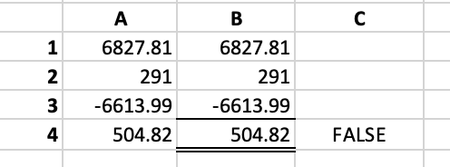

There are much better detailed descriptions of this but basically excel needs to use binary to represent those numbers. Binary can represent whole numbers very easily but even then very large numbers reach a limit. For fractions it is even more so. So simply increase the number of digits being displayed and you will see:
so excel has to represent 6827.81 using binary and then -6613.99 using binary and add those 2 numbers together and those 2 representations happen to have just enough round off error to creep into a very low digit that is within the significance kept by excel. If you break those numbers up to be 6827 + 0.81 it doesn't happen or -6613 - 0.99 it doesn't happen. There are many of these rare occasions where that last bit rounds (or flips) up. If you are really interested in the details I welcome you to dive deeper into Excel round off errors but just make sure to use ROUND(..) when checking for exact values or >= or <= when comparing values.
 iwaddoApr 07, 2026Tin Contributor
Thank you. I've found the anomaly.
I've been using Excel for years and have experience of needing to use Round() for more complex calculations but never seen the problem manifest itself so simply and in such a repeatable way.
Thank you for your help.