Forum Discussion

G_u_s_t_a_v
Jul 03, 2020Copper Contributor
Excel Save as Unicode Text (with line breaks) and then trying to open the Unicode Text file in Excel
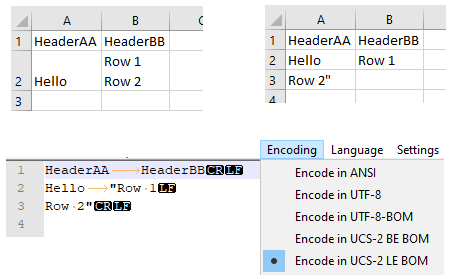
I don't understand how the Text Import Wizard handle line feeds within a column. Trying to create files that are accepted by Excel but it seems a bit harder than expected. A simple test that, in ...

Subodh_Tiwari_sktneer
Jul 03, 2020Silver Contributor
Yes, that's a bit confusing and it happens exactly as you described.
When I tried to import the same text file through Power Query, the file origin was set to 1200:Unicode by default and this option is not available when you open the text file with text import wizard and interestingly when imported through Power Query the data is loaded as it was originally there i.e. A2 contains Hello and B2 contains Row1 Row2 when loaded onto the Sheet, though shows Row1Row2 in a single line, separates in individual lines as soon as Wrap Text is enabled.