Forum Discussion

Excel Save as Unicode Text (with line breaks) and then trying to open the Unicode Text file in Excel
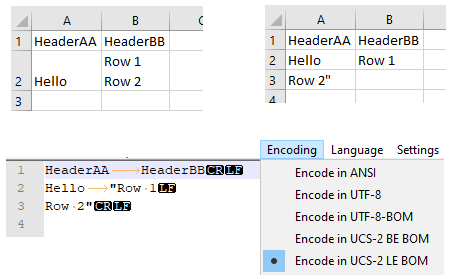

G_u_s_t_a_v The Image you have attached is perfect
Actually when you save the excel file to .txt format and you open that txt file in notepad there you will see that the data of one cell has been splitted to different rows so whenever you try to import the same file in excel it will always import the file into different rows.
Secondly if you have a text file to be imported to excel with a specific format then please let me know I ca help you with that.
 G_u_s_t_a_vJul 03, 2020Copper Contributor
That is not entierly true. When you save the text file where there are line feeds in a cell, Excel will (normally) add the text qualifier ("). In a cell the line break also differ slightly, only LF is used. A 'real' row break is both CR+LF. You can see this in the picture that is attached to the thread where you have the screendumps from Excel before export, after import, and from Notepad++ (to see the characters you don't see in Notepad and which file encoding that is used).
- DevendraJainJul 03, 2020Iron Contributor
G_u_s_t_a_v Sorry for misleading Information above
I dint know about this
But I would surely love to learn from you how to see the screendumps