Forum Discussion

Excel PivotTable Average Subtotals - incorrect results
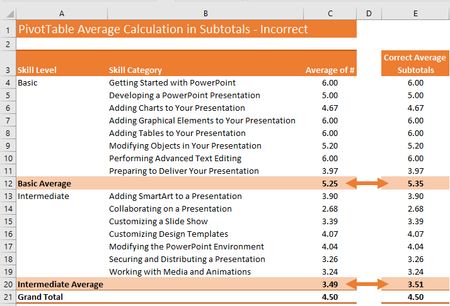

SergeiBaklanIs there any way to get the PivotTable options to choose the correct option?

Again, correct or not correct depends on what exactly we would like to calculate. If average of all sublevel averages, not the average for entire level - when we need to add data to data model, write DAX measure which calculates above and use it in PivotTable.
- JJolieMar 26, 2020Copper Contributor
SergeiBaklanThe reason why I call it 'incorrect' is because when people look at the averages and do the quick math on these numbers, they'll assume the calculation of the subtotal/average calculation is incorrect. People won't necessarily understand that the subtotal is basing its result on a different source of numbers.
So, for clarity, I was hoping it would be possible to average the averages above and show that. Is this not possible? Or is there no easy way to represent this the way I'm asking for it? i.e. show the average subtotals as the numbers on the right instead?
- SergeiBaklanMar 27, 2020Diamond Contributor
JJolie , it's possible, but that not out of the box setting. Again, that could be the measure created in data model using DAX language and after that used in PivotTable.