Forum Discussion

Excel Pivot Table Filter and Label Formatting
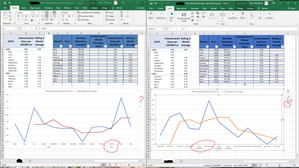

Riny_van_Eekelen Thanks for your response. My apologies, I neglected to mention that I was aware of the fact that the buttons wouldn't show unless the chart was selected, and being a static pic, that wasn't apparent. When the first chart was selected, the filter button did not appear as it did in the second one.
Also, the chart on the right is a direct result of copy/paste (Control C/V), which is why I don't understand how it became formatted differently.

Johnbda Can't really tell why the filter buttons don't appear in the first chart, but perhaps a good idea to upload your file, provide it doesn't contain any confidential information, to determine why the formatting is off.
- JohnbdaJun 28, 2021Copper Contributor
Riny_van_Eekelen Thanks again for responding, as it turns out, I've been asked to go in a different direction for presenting the data, but I'm still very curious about what happened and why. I won't upload the document, however I would point out that the initial chart copied shows a box to check for "Multi-level Category Levels" and the copied chart does not.
Initial Chart
Copied Chart
Above you can also see with the charts selected, the first chart does not have the filter button, whereas the second does.