Forum Discussion

jwenzCHUBB
Jun 27, 2022Copper Contributor
Excel Pivot Table Column
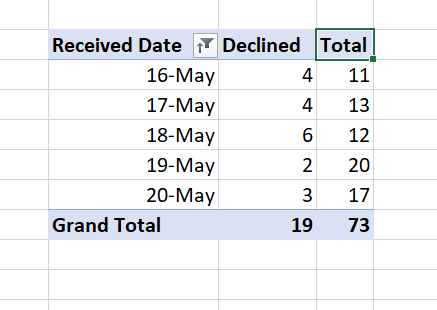
Hello all, Is there a way to make my own column in a pivot table? I'll provide the existing table for reference: I would like to make a column that simply outputs the difference between "...

jwenzCHUBB
Jun 28, 2022Copper Contributor
Thanks, I'm an amateur with this. Can you help more specifically?
The total is calculated by the sum of rows existing under the same received date,
Using the example above: On May 16th, there were 11 total items created and 4 of them were declined. Thus 7 is the number I would like to have in another column.
The reason being is I plan to automate an email that sends out the pivot table and although it is quite easy to do the math, my boss is asking otherwise.
I can add a column to the table the pivot table is pulling from if this might help? Thanks for the help and suggestions as always!
The total is calculated by the sum of rows existing under the same received date,
Using the example above: On May 16th, there were 11 total items created and 4 of them were declined. Thus 7 is the number I would like to have in another column.
The reason being is I plan to automate an email that sends out the pivot table and although it is quite easy to do the math, my boss is asking otherwise.
I can add a column to the table the pivot table is pulling from if this might help? Thanks for the help and suggestions as always!

SergeiBaklan
Jun 28, 2022Diamond Contributor
I assume you are on Excel Desktop on Windows.
Creating PivotTable add data to data model
Add date to rows in PivotTable Fields pane.
Right click on table name and Add measure
Add 3 measures one by one, it looks like
Measures are
Total:=COUNTROWS( Table1 )
Declined:=CALCULATE( [Total], Table1[IsDeclined] = "Yes" )
Not Declined:=[Total] - [Declined]
Add measures to values
Finally