Forum Discussion

jvahlund
Oct 04, 2021Copper Contributor
Excel pivot calculated field
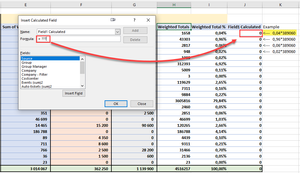
Hello, I have a problem which I dont know how to solve. In my pivot, I have added a column named "Weighted Total %" based on the column next to it called "Weighted Totals". This percentage repres...


SergeiBaklan
Oct 04, 2021Diamond Contributor
That could be done with data model measure (if only you are not on Mac). Creating PivotTable add data to data model, for such sample
add DAX measure as
BB:=VAR grandTotal=CALCULATE( SUM(Table1[B]), ALL(Table1) ) RETURN DIVIDE(SUM(Table1[B]), grandTotal, 0)*389060and use it in PivotTable.
 jvahlundOct 05, 2021Copper Contributor
Thank you so much for your reply. I actually came around this issue with another solution (in my SQL statement.) But I really appreciate your time and effort in replying to this.
I'll have that in mind until the next time 🙂
Cheers!
- SergeiBaklanOct 05, 2021Diamond Contributor
jvahlund , you are welcome, thank you for the feedback.
In general creating PivotTable it's always better to work with data model, you have much more power compare to PivotCache PivotTable.