Forum Discussion

cakarem
Feb 11, 2022Copper Contributor
Excel Page Width Error
Hi, I'm often using Excel. But , i can not understand issue that: I set page size to A4 ( 210 x 297 mm ) . Then i add rectangular which width size is 210 mm to my sheet. Despite rectangular width a...
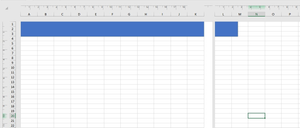

cakarem
Feb 11, 2022Copper Contributor
jitinm You dont understand me. Can you try that you should add shapes ( exp. rectangular shape)

jitinm
Feb 11, 2022Iron Contributor
- cakaremFeb 11, 2022Copper Contributor
jitinm i examined to your file. But i see that your use scaleing. Please not use scale. Original size %100 scale
- jitinmFeb 11, 2022Iron Contributor
cakarem If you see even after setting the margins to "0" there is still gap left in left and right which cannot be removed and it will stay. So considering that in mind you need to adjust one or the other thing. I hope you understand.
- cakaremFeb 11, 2022Copper ContributorPerfect, you start understanding me. So, i how learn size of stiil gap left or right. Why is there gap there.
I just it must be fit and must not be overflow when i want to add rectangular which width size 210mm on page which size is A4 size ( there shouldn't be not left or right gap. How its zero )
OR
how should i place it on page ( margin is zero or equals gap )