Forum Discussion

Excel novice struggling with formulas please help
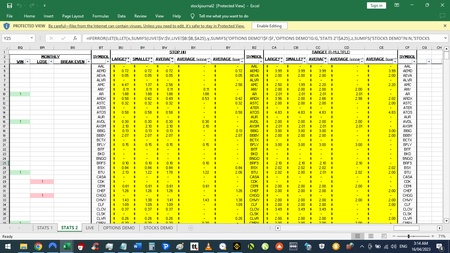
- Apr 15, 2023
1. Right off the bat, this workbook is poorly optimized.
2. The workbook makes use of functions not available in your version of Excel. From the screenshots you've posted, it looks like you're working in Excel 2016. Functions like MINIFS, MAXIFS, LET, LAMBDA, etc. are not available.
Any time MAXIFS or MINIFS are used, you'll need to arrange them like ctrl+shift+arrays. For example,:
{=MAX(MAX(IF(StockSymbol=A4,IF(StockResult="W",IF(StockProfitF>0,StockProfitF)))),MAX(IF(LiveSymbol=A4,IF(LiveProfitF>0,LiveProfitF))))}I've fixed the formulas in G, M, and P. The formulas are using dynamic ranges so the calculation won't be bogged down by entire column references (e.g. F:F, H:H).
The part I don't understand about how these formulas was written is why would the freelancer use newer functions (and even LAMBDA) but not optimize the workbook? There's no spilling and the referencing is lazy. The COUNTIFS and SUMIFS are fine but there's no need to refer to the entire column for the criteria.
I fixed the first few formulas then took a step back and looked at the rest of the workbook. It's going to take a bit of time to overhaul this workbook but it's do-able and it will calculate a lot faster if everything is fixed.
Attached is a sample of a few things I've re-done.

1. Right off the bat, this workbook is poorly optimized.
2. The workbook makes use of functions not available in your version of Excel. From the screenshots you've posted, it looks like you're working in Excel 2016. Functions like MINIFS, MAXIFS, LET, LAMBDA, etc. are not available.
Any time MAXIFS or MINIFS are used, you'll need to arrange them like ctrl+shift+arrays. For example,:
{=MAX(MAX(IF(StockSymbol=A4,IF(StockResult="W",IF(StockProfitF>0,StockProfitF)))),MAX(IF(LiveSymbol=A4,IF(LiveProfitF>0,LiveProfitF))))}
I've fixed the formulas in G, M, and P. The formulas are using dynamic ranges so the calculation won't be bogged down by entire column references (e.g. F:F, H:H).
The part I don't understand about how these formulas was written is why would the freelancer use newer functions (and even LAMBDA) but not optimize the workbook? There's no spilling and the referencing is lazy. The COUNTIFS and SUMIFS are fine but there's no need to refer to the entire column for the criteria.
I fixed the first few formulas then took a step back and looked at the rest of the workbook. It's going to take a bit of time to overhaul this workbook but it's do-able and it will calculate a lot faster if everything is fixed.
Attached is a sample of a few things I've re-done.
 alexx1202May 15, 2023Tin Contributor
Hi Patrick2788
Thanks for fixing those columns for me. Saved me a lot of time.
Can the 2016 version change the durations of each symbol to show as X days X hours X min etc. and not in 00:00:00:00 format?
- Patrick2788May 16, 2023Silver Contributor
I would forego the text listing of day/times. Excel 2016 doesn't have the LET function so a formula to present the duration as such would get really messy.
In fact, I'd pull the 3 different times in separate columns to simplify the calculations. I've attached the workbook where I've pulled the numbers via INDEX-MATCH and then running calculations for MIN, MAX, and AVERAGE is simpler.
- alexx1202May 21, 2023Tin Contributor
Hi @Patrick2788
I’m a bit confused. Why does cell X10 show as 38 mins? What is each cell in columns X, Y and Z meant to represent? The durations displayed for symbol ARDX in columns AB and AC are wrong too.
Also, if it is too calculation intensive to show durations in text listing, is there a way in 2016 excel to display for e.g., 1 day 2 hours 3 min and 4 sec as 01:02:03:04?
A couple of trades go longer than 30 days. When that happens excel resets the clock. E.g. A trade lasts 31 days 2 hours 3 min and 4 sec and is shown as 01:02:03:04. Displaying it as a text listing solved that problem.
Alex