Forum Discussion

Tai Excel
May 06, 2018Copper Contributor
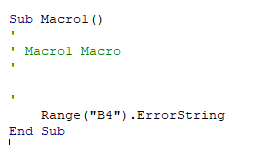
Excel Macro Recording - Generate Wrong VBA
Hi, need helps here. Background I have prior Macro recording and VBA experience in Excel. After I install and active Office 365 ProPlus on my new machine (ThinkPad E480), the Macro recording...

arianne.gcruz
May 09, 2018Copper Contributor
Hi! I also experience the same thing. Instead of copy, paste, etc, my "record macro" produces vba that says "delete". I don't see the feedback button in my excel 2016. What can I do to correct it? Thank you!
- Tai ExcelMay 11, 2018Copper Contributor
it's now resolved via simple method below
1. uninstall Office (don't borthered with online repair)
2. reboot computer
3. install office with new setup file
hope this helps
 Amanda AndersonJun 21, 2018Copper Contributor
Hi Tai,
I'm having the same trouble with my new Thinkpad, and even after reinstalling Office, I'm getting the same errors with Excel macros. Any other suggestions?
 Haytham AmairahMay 10, 2018Silver Contributor
Hi Arianne,
There is a ribbon tab called Help!
If you don't find it, right-click the ribbon and select Customize the Ribbon, then find the Help checkbox, and check it.
If you didn't find it, then it's not available in your version of Excel, in this case, you can ask this https://answers.microsoft.com/en-us/msoffice/forum/msoffice_excel which is the best place to get support.
Regards
