Forum Discussion

Jacobs1
Feb 03, 2026Copper Contributor
Excel keeps changing “January 2026” into “JAN-26”. How can I force it to display “January 2026”?

Olufemi7
Feb 07, 2026Steel Contributor
Hello Jacobs1,
Excel is treating the entry as a date and applying a short date format. Fix it one of these ways:
Option 1: Keep it as a real date
- Enter a date like 1/1/2026
- Select the cell
- Press Ctrl + 1 or Cmd + 1 to open Format Cells
- Choose Custom
- Type mmmm yyyy
- Click OK
- → This will display January 2026 while still allowing sorting and formulas
Option 2: Keep it as text
- Type 'January 2026 (include the leading apostrophe)
2. → Excel will treat it as text and will not reformat it
Microsoft Docs: Format a date the way you want in Excel
 Jacobs1Feb 10, 2026Copper Contributor
Hello,
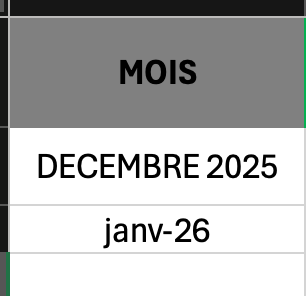
Thank you for your reply. I did what you asked me to do even before your message but it didn't work. I have tried again but it still doesn't work.
Look at the picture below. I think there is another issue but I don't know what to do.
Thanks in advance for your help.