Forum Discussion

Excel interface broken
 Jun 18, 2018
Hi,
Please see the below GIF to figure out how to change the view.
Hi,
Go to (Project - VBAProject) window, and double-click the title bar in order to move the window to its default position.
Do the same thing for one of the other windows.
Regards

Thank you Haytham,
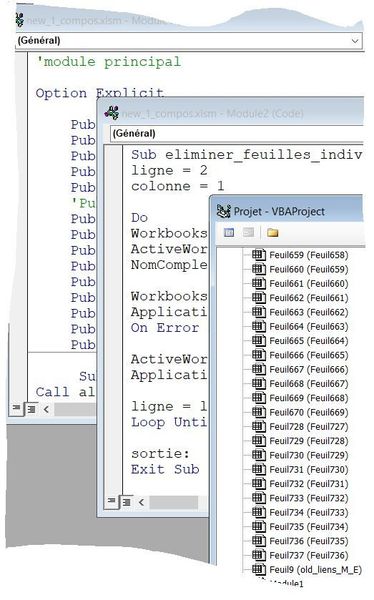
Probably I didn't understand well your suggestion because now all my contents (Project, module 1 , module 2) are no longer visible together on my screen. When I click "display" this or that, new contents appear separately in the same window, each one replacing the other. And I don't know how to do in order to have the 3 windows displayed, like on my screen attached to my firts post.
Do you know what happened ?
I need really help because its not possible to work with Excel in this configuration !
Thank you in advance
regards
Pierre
- Haytham AmairahJun 15, 2018Silver Contributor
Hi,
Please see the screenshot below to understand what I talking about.
If you want to set the view as the previous view in the previous post, go to the menu of Window >> Cascade
Regards
- Pierre RUELJun 17, 2018Copper Contributor
Hi Haytham,
I tried to follow your instructions but a new problem appeared: now I have only one excel window left on the screen and when I click Display (Affichage in French) each view (code module 1, code 2, project) replaces each other in the unique window.
Waht I would like to see is as on screen capture below (from an older Excel version):
I would preferably re-install Excel but it is the 2016 version and I have no CD of the software !
I'm completely stuck !
Thanks for any help.
Regards
Pierre
- Haytham AmairahJun 17, 2018Silver Contributor
Hi Pierre,
Please show me a screenshot of what you got so far.
