Forum Discussion

NaurisLatvia28
Dec 28, 2018Tin Contributor
Excel highlight numbers in range by input
I pretty much forgot about VBA, cause i was learning it in school. But i like to do something in Excel. Let's take a look at my tables from beginning. This all is just for my lottery St...
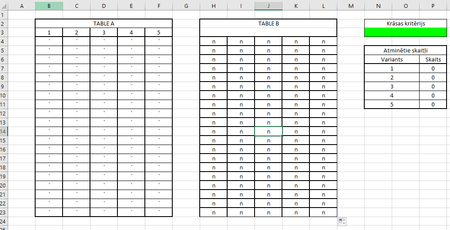
 Dec 28, 2018
Sorry, I didn't realize you had this on multiple worksheets in the workbook, changed to a workbook change event. So the code goes in ThisWorkbook. Added to what you had posted and attached.
Private Sub Workbook_SheetChange(ByVal Sh As Object, ByVal Target As Range)

 Dim TicketRange As Range
 Dim DrawRange As Range
 Dim Cell As Range
 Dim CheckRange As Range

 Set TicketRange = Range("B4:F23")
 Set DrawRange = Range("H4:L23")

 For Each Cell In TicketRange

 Set CheckRange = Range("H4:L23").Find(What:=Cell.Value, LookIn:=xlValues, LookAt:=xlWhole, MatchCase:=False)

 If Not CheckRange Is Nothing And Cell.Value <> "" Then

 Cell.Interior.ColorIndex = 4

 Else

 Cell.Interior.ColorIndex = 0

 End If

 Next Cell

 End Sub
JWR1138
Dec 28, 2018Iron Contributor
Hi, Here are a couple of options, If you want to have the coloring happen only when you manually run the code stick this in a module:
Sub Color()

 Dim TicketRange As Range
 Dim DrawRange As Range
 Dim Cell As Range
 Dim CheckRange As Range

 Set TicketRange = Range("B4:F23")
 Set DrawRange = Range("H4:L23")

 For Each Cell In TicketRange

 Set CheckRange = Range("H4:L23").Find(What:=Cell.Value, LookIn:=xlValues, LookAt:=xlWhole, MatchCase:=False)

 If Not CheckRange Is Nothing And Cell.Value <> "" Then

 Cell.Interior.ColorIndex = 4

 End If

 Next Cell

End Sub

Sub UnColor()

 Dim TicketRange As Range
 Dim Cell As Range

 Set TicketRange = Range("B4:F23")

 For Each Cell In TicketRange

 Cell.Interior.ColorIndex = 0

 Next Cell

End Sub
If you want the code to run every time you change a cells value on the worksheet than stick this in the VBA for your worksheet:
Private Sub Worksheet_Change(ByVal Target As Range)

 Dim TicketRange As Range
 Dim DrawRange As Range
 Dim Cell As Range
 Dim CheckRange As Range

 Set TicketRange = Range("B4:F23")
 Set DrawRange = Range("H4:L23")

 For Each Cell In TicketRange

 Set CheckRange = Range("H4:L23").Find(What:=Cell.Value, LookIn:=xlValues, LookAt:=xlWhole, MatchCase:=False)

 If Not CheckRange Is Nothing And Cell.Value <> "" Then

 Cell.Interior.ColorIndex = 4

 Else

 Cell.Interior.ColorIndex = 0

 End If

 Next Cell

 End Sub

NaurisLatvia28
Dec 28, 2018Tin Contributor
Thanks for trying to help.
But nothing works for me.
Maybe i can send You a copy of my worksheet?