Forum Discussion

kpan8
Feb 13, 2025Copper Contributor
Excel help
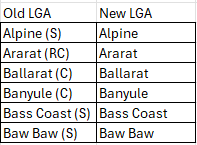
Hi all, I have list of LGA location names in excel file. An example are as follows: Currently after I extract the data, I use look up function to get the New LGA column to replace the ...

Kidd_Ip
Feb 13, 2025MVP
Try this:
Sub UpdateLGA()
    Dim ws As Worksheet
    Dim lastRow As Long
    Dim lookupRange As Range
    Dim i As Long
    Dim lookupValue As String
    Dim result As Variant

    ' Set the worksheet
    Set ws = ThisWorkbook.Sheets("Sheet1") ' Change to your sheet name

    ' Find the last row with data
    lastRow = ws.Cells(ws.Rows.Count, "A").End(xlUp).Row

    ' Set the range for the lookup table
    Set lookupRange = ws.Range("D1:E" & lastRow) ' Change to your lookup table range

    ' Loop through each row in the LGA column
    For i = 2 To lastRow ' Assuming headers in row 1
        lookupValue = ws.Cells(i, 1).Value ' Change to the column with your LGA names
        result = Application.VLookup(lookupValue, lookupRange, 2, False)

        If Not IsError(result) Then
            ws.Cells(i, 2).Value = result ' Change to the column for the New LGA
        Else
            ws.Cells(i, 2).Value = "Not Found" ' Handle not found case
        End If
    Next i
End Sub