Forum Discussion

Excel Help - Vlookups/ List Data

Hi CatD0203
This is difficult to understand:
What I want to try to achieve is:
- Based on cell F11 'Rider', look to list > select next 'rider' in list
- When data selected, cumulative values in H3:H24, not to exceed cell I11 'max rally' figure.
Can you expand on each of the bullets to make it clearer?
What does "next 'rider' in list" mean exactly?
What does "cumulative values in H3:H24" mean? On the list sheet? Why not H2? What does cumulative mean in the context of column H on the list sheet, which seems to hold Yes and No values.
 CatD0203Jul 17, 2023Copper Contributor
You're absolutely right. Sorry, I think I spent too many hours trying to articulate what I needed that I haven't been able to explain myself properly.
Let me know if this is clearer?
Within my workbook I have two tabs:
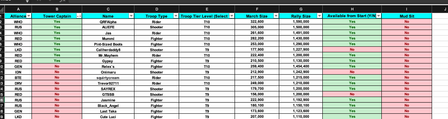
- Tab 1 (Image one) - 'List Data'
- Tab 2 (image 2) 'Turret Info'
Tab 1 'List Data', is a list of all active players and has a series of categories columns "A" - Alliance, through "I" - Mud Sit.
Tab 2 'Turret Info' is what I am hoping to populate based on tab 1 information.
Within Tab 2 table/cells start from D11:I11; D11:D24 (image 2 in original post)
What I want to do is select ‘Troop Type’ from a drop down in cell F11 – Rider, Shooter, Fighter (which I have); and hopefully create a VLOOKUP or function that would allow data from Tab1 (list data) to fill the following 12 rows based on troop type i.e., rider.
While the list is populating, I need to ensure that the sum total of cells H13:H24, does not exceed the value in I11. The value in I11 is based off of the first name in the list data matching ‘Rider’ type.
If this is too many circular references or too complex for excel let me know and I’ll manually do it!
Thanks again for looking and the feedback.
- flexyourdataJul 17, 2023Iron Contributor
Assuming you have access to the FILTER function, you can try this in cell E14 on the Troop Type sheet. Adjust the List Data range appropriately.
=LET(
lookupData, 'List Data'!C2:G20,
troopTypeCol, CHOOSECOLS(lookupData, 2),
nameCol, CHOOSECOLS(lookupData, 1),
filteredData, FILTER(lookupData, (troopTypeCol=F13)*(nameCol<>E13)),
filteredData
)
Please try that for now. It doesn't resolve the max-sum issue, but I need more detail to understand how to resolve that.
When you say "ensure doesn't exceed", do you mean to just keep taking riders until one row before the sum would exceed the rally size? Does the order of the riders matter?
- CatD0203Jul 18, 2023Copper Contributor
That definitely worked to populate the list!!
I need the list to stop at 12 names. So when 12 names/rows are populated, no more.
The not to exceed values:
So each 'Name' - comulmn C in the 'List Data' tab has a troop type (Rider, Shooter, Fighter), Troop Tier (T7, T8,T9, T10 - this bit isnt really relevant), March Size and Rally Size stats.
The first name populated in the table determines the 'Max Rally' shown in I11 - in real terms this mean the maximum number of troops that this player can carry. The 'March Size' per 'Name' is the max number of troops they can dispatch.
i.e. if max rally size was 1000
Player 1 - has a march size of 800
Player 2 - has a march size of 150
Player 3 has a march size of 150
Only player 1 and player 2 (or player 3) could fit without exceeding max rally size. The purpose of the table is try to populate 12 names/rows that most efficiently fit within the max rally size.
Hope that helps?
And thanks so much already - massive win!!