Forum Discussion

Excel Graph Formatting

 Aug 05, 2018
How about the attached?
I think that does everything you asked for..
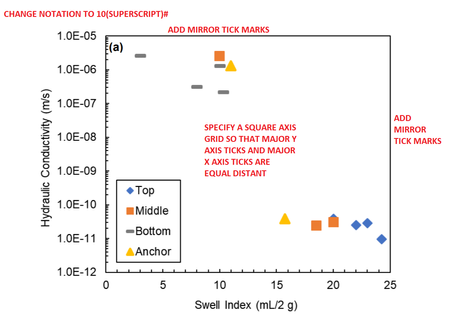
This was mostly just adding a 'dummy' series on a secondary axis to trick excel into adding the mirror numbers/check marks. For some reason, and i think its to do with the fact that we are dealing with negative numbers, although i could get the axis labels to appear top and bottom the check marks would only show at the top..
So I put my dummy series to use, made the value 1e-12 across the board, which gives you a series that just runs along the 'bottom' of the graph. I then drew a little vertical line (insert ->shape->line) and replaced the dummy series marker with that little line, to give me a fake check mark.. but it seems to work ok.
Finally the same sized major check mark.. I really thought there was a way to set the size of the plot area but I cant see it so maybe not. I resorted to drawing a box which i put on top of the graph at 0 and just resized the plot area until the first major tick marks lined up.. it works I guess?
How about the attached?
I think that does everything you asked for..
This was mostly just adding a 'dummy' series on a secondary axis to trick excel into adding the mirror numbers/check marks. For some reason, and i think its to do with the fact that we are dealing with negative numbers, although i could get the axis labels to appear top and bottom the check marks would only show at the top..
So I put my dummy series to use, made the value 1e-12 across the board, which gives you a series that just runs along the 'bottom' of the graph. I then drew a little vertical line (insert ->shape->line) and replaced the dummy series marker with that little line, to give me a fake check mark.. but it seems to work ok.
Finally the same sized major check mark.. I really thought there was a way to set the size of the plot area but I cant see it so maybe not. I resorted to drawing a box which i put on top of the graph at 0 and just resized the plot area until the first major tick marks lined up.. it works I guess?
 Thomas WilliamsAug 05, 2018Copper Contributor
Hi Philip,
Thanks a ton for putting this together! Your solution for the secondary axes looks great, very creative! I think if I draw the box and resize the plot area to fit it, that may work, as long as it looks close enough to square so that the editors can't notice the difference.
The one thing left is that I'd like to change the exponential format, for example, changing 1E-10 to 10^-10, with the -10 being an actual superscript without the "^" symbol.
- Philip WestAug 05, 2018Steel Contributor
Hia,
I think the only way to do what you want is to just get rid of the axis labels all together and then replace it with text boxes... I've attached another copy with a quick go at that.
With the Format->align/distribute controls you can quite easily arrange the text boxes to look right, and then just group them up, copy the set to the other side, and group everything together.
Just have your plot area sized exactly right, and then put the axis labels on last so you don't have constantly resize things over and over.