Forum Discussion

glarsen
Jul 07, 2025Copper Contributor
Excel Formulas not Working
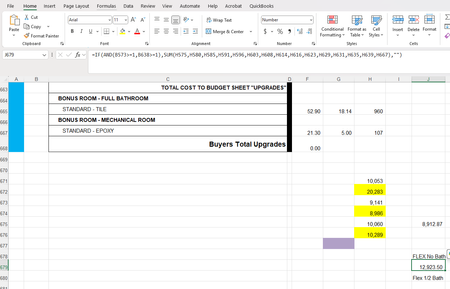
The formula (J679) I have in the first image should return a value of 1 if the conditions in B573 and B638 is greater than or = to 1, which should sum the H cells. With nothing in eith...

OliverScheurich
Jul 08, 2025Gold Contributor
Does it work if you add NUMBERVALUE to your formula?
=IF(AND(NUMBERVALUE(B573)>=1,NUMBERVALUE(B638)>=1),SUM(.......),"")
- m_tarlerJul 08, 2025Silver Contributor
The problem is that "" is a text value and text is > numbers (think of sorting from low to high you want it to start with 0-9999... and then A-Z ...)
So as suggested by Oliver you can use NUMBERVALUE() or you can use N() or you can change the formulas in B573 and B638 to return an actual 0 instead of "" or maybe return "Y"/"N" and check for those values. If you want something more 'hidden" you can actually use " " vs " " and check >" " or check LEN()
