Forum Discussion

EXCEL FORMULA
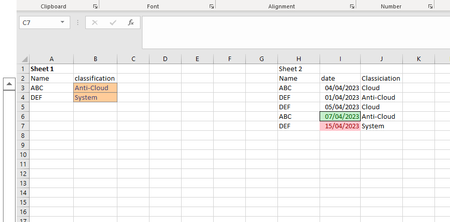

As an alternative, if I may add...
Here’s an example formula that you can use in the “Cloud Classification” column in Sheet1:
=INDEX(Sheet2!C:C,MATCH(1,(Sheet2!A:A=A2)*(Sheet2!B:B=MAX(IF(Sheet2!A:A=A2,Sheet2!B:B))),0))
This is an array formula, so you need to enter it by pressing Ctrl+Shift+Enter instead of just Enter.
This formula assumes that the “Name” column is in column A and the “Date” column is in column B in both sheets, and the “Cloud Classification” column is in column C in Sheet2.
You can adjust the column references as needed.
This formula will find the row in Sheet2 where the “Name” matches the current row in Sheet1 and the “Date” is the latest for that “Name”.
It will then return the value from the “Cloud Classification” column in that row.
I hope this helps!