Forum Discussion

Katelyn555
Jul 10, 2019Copper Contributor
Excel Formula with date
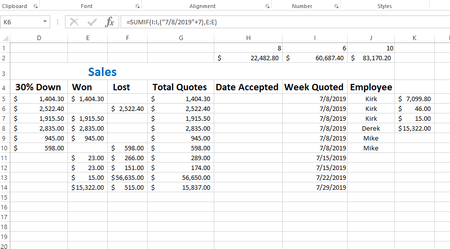
I am trying to sum a series of data based on all totals from each week. In column G I have a list of quote totals, dollar amounts, In column I there is the "week of" date when the quote was given...

Roger Govier
Jul 10, 2019Brass Contributor
Great idea, but I think it would be better to use =WEEKNUM(I5) rather than DAY(I5)
The DAY will get repeated in other months e.g 01 Jan 2019 and 01 Oct 2019, whereas Weeknum will not

SergeiBaklan
Jul 10, 2019Diamond Contributor
And week number is repeating every year. Why don't SUMIF based on date?
=SUMIF($I$5:$I$14,I5,$K$5:$K$14)
- Roger GovierJul 11, 2019Brass Contributor
You are quite right Sergei.
In reality, I would never choose to see my weekly totals within the same table as the source data, and have it repeated over several lines.
I would prefer to create a simple Pivot Table based upon the OP's source data, and just add Date as the Row field and Sum of Total Quotes as the Data field.
- SergeiBaklanJul 11, 2019Diamond Contributor
Yes Roger, it's always better not to repeat same information and separate reporting from source data