Forum Discussion

Katelyn555
Jul 10, 2019Copper Contributor
Excel Formula with date
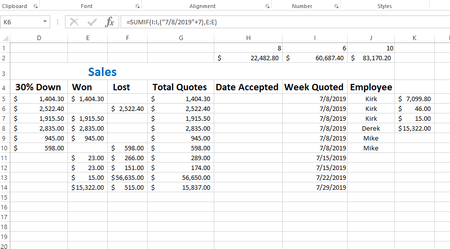
I am trying to sum a series of data based on all totals from each week. In column G I have a list of quote totals, dollar amounts, In column I there is the "week of" date when the quote was given...

tauqeeracma
Jul 10, 2019Steel Contributor
Hi,
I have slightly modified the file, hope it will serve the purpose.
Please see the attached file.
Thanks, Tauqeer
 Roger GovierJul 10, 2019Brass Contributor
Great idea, but I think it would be better to use =WEEKNUM(I5) rather than DAY(I5)
The DAY will get repeated in other months e.g 01 Jan 2019 and 01 Oct 2019, whereas Weeknum will not
- SergeiBaklanJul 10, 2019Diamond Contributor
And week number is repeating every year. Why don't SUMIF based on date?
=SUMIF($I$5:$I$14,I5,$K$5:$K$14)
- Roger GovierJul 11, 2019Brass Contributor
You are quite right Sergei.
In reality, I would never choose to see my weekly totals within the same table as the source data, and have it repeated over several lines.
I would prefer to create a simple Pivot Table based upon the OP's source data, and just add Date as the Row field and Sum of Total Quotes as the Data field.
