Forum Discussion

Dominica Smith
Oct 10, 2017Tin Contributor
Excel Formula to calculate month between dates in different years
Hi Excel Community, I consider myself an advanced user of Excel but evern this formula has me a little stumped. I have a data sheet with various lines of contracts with varying contract term date...
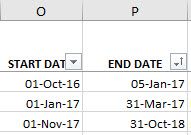
 Oct 10, 2017
Thanks for the quick response, however, how do we get it to simply count the months instead of full months?
Example: 1-Jan-17 to 28-Feb-17 equals 2, not 1.

Haytham Amairah
Oct 10, 2017Silver Contributor
Hi,
The formula you typed isn't valid!
You have to use something like this:
=IF(AND(YEAR(A1)=2017,YEAR(B1)=2017),
DATEDIF(A1-1,B1+1,"m"),

IF(AND(YEAR(A1)<>2017,YEAR(B1)=2017),
DATEDIF(DATE(2017,1,1)-1,B1,"m"),

IF(AND(YEAR(A1)=2017,YEAR(B1)<>2017),
DATEDIF(A1,DATE(2017,12,31)+1,"m"),

IF(AND(YEAR(A1)<>2017,YEAR(B1)<>2017),
0,

))))
But please note that this formula counts only the completed months in 2017.
Please see the attached workbook to test the formula.
Regards,
- Dominica SmithOct 10, 2017Tin Contributor
Thanks for the quick response, however, how do we get it to simply count the months instead of full months?
Example: 1-Jan-17 to 28-Feb-17 equals 2, not 1.
- Dominica SmithOct 10, 2017Tin ContributorFigured it out!!!
=DATEDIF(MAX(O2,DATEVALUE("01-Jan-17")),MIN(P2,DATEVALUE("31-Dec-17")),"m")+1- Oct 10, 2017I'd also suggest adding two columns and using those to split out the min and max parts of this function. Just to make it a little clearer to anyone else who needs to work with this formula down the track.
