Forum Discussion

macz123
Feb 26, 2021Copper Contributor
Excel formula help
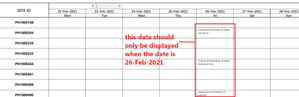
Good Day Everyone is there any way i can link the cells below a cell that contains date. so that when i change the display week it will also change. here are some screenshots that will further explai...

HansVogelaar
Feb 26, 2021MVP
For example in cell B6 on the MINDSOFT sheet:
=IF(B$3=TODAY(),"'-cutting and bending of rebars
-chb fence","")
(There is a line break Alt+Enter after rebars)
Fill to the right to H3.

mtarler
Feb 26, 2021Silver Contributor
macz123 alternatively you can use conditional formatting to make the text white and not visible
Assuming you only want the information in B5:H15 to show up if the Date in row 3 is today then:
conditional formatting -> custom formula -> =( B$3 <> TODAY() )
in the attached I did it for 'MINDSOFT' sheet