Forum Discussion

macz123
Feb 25, 2021Copper Contributor
Excel formula help
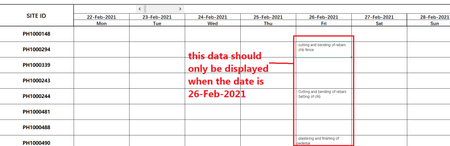
Good Day Everyone is there any way i can link the cells below a cell that contains date. so that when i change the display week it will also change. here are some screenshots that will further explai...

HansVogelaar
Feb 26, 2021MVP
For example in cell B6 on the MINDSOFT sheet:
=IF(B$3=TODAY(),"'-cutting and bending of rebars
-chb fence","")
(There is a line break Alt+Enter after rebars)
Fill to the right to H3.
 macz123Feb 26, 2021Copper Contributorthank you for the help and idea. I really appreciate it. I use =IF(B$3=datevalue("date"),"'-cutting and bending of rebars
-chb fence","")- mtarlerFeb 26, 2021Silver Contributor
macz123 alternatively you can use conditional formatting to make the text white and not visible
Assuming you only want the information in B5:H15 to show up if the Date in row 3 is today then:
conditional formatting -> custom formula -> =( B$3 <> TODAY() )
in the attached I did it for 'MINDSOFT' sheet
