Forum Discussion

Excel formula help
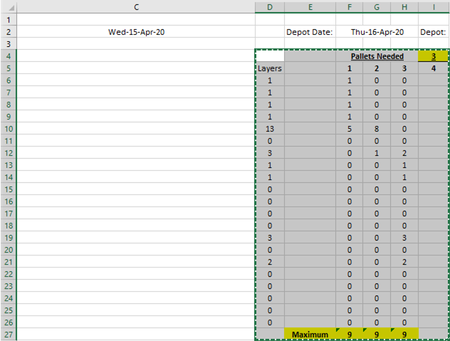
- Apr 16, 2020
Replicated your sheet and believe that this formula will do what you need.
=IF((SUM(F$5:F5)+$D6-SUM($E6:E6))<=9,$D6-SUM($E6:E6),9-SUM(F$5:F5)+SUM($E6:E6))Important that column E remains empty and the the headers in row 5 are text (i.e. not numbers) or that you insert an empty row 5. Enter the formula in F6 and copy it down and across as far as you need.

Replicated your sheet and believe that this formula will do what you need.
=IF((SUM(F$5:F5)+$D6-SUM($E6:E6))<=9,$D6-SUM($E6:E6),9-SUM(F$5:F5)+SUM($E6:E6))Important that column E remains empty and the the headers in row 5 are text (i.e. not numbers) or that you insert an empty row 5. Enter the formula in F6 and copy it down and across as far as you need.

Riny_van_Eekelen That works perfectly thank you so much!! i have been trying to work this out for WEEKS!
- Riny_van_EekelenApr 16, 2020Platinum Contributor
marc47555 Glad it worked!
- marc47555Apr 16, 2020Copper Contributor
Riny_van_Eekelen it did thank you, how ever now they have told me i cant have more than 3 different layers on a pallet, ( layers are separate products ) I'm not sure if this is possible!? thanks anyway
- Riny_van_EekelenApr 16, 2020Platinum Contributor
Please see the attached workbook. I believe it fixes the problem. Tweaked the formula a little bit.