Forum Discussion

Excel formula - Show value in dedicated cell based on various values in multiple cells.
- Feb 03, 2022
See the attached sample workbook. I used a list of public holidays in The Netherlands; you can edit the list as needed.

See the attached sample workbook. I used a list of public holidays in The Netherlands; you can edit the list as needed.

Good morning Hans,
I have been 'playing around' with the file you submitted me.
Working nicely, also with the holidays.
But i still have some minor issues with some formula's. I tried to adjust some formula's but as this is far above my knowledge i had to give up....
Hope you can help me here one more time.
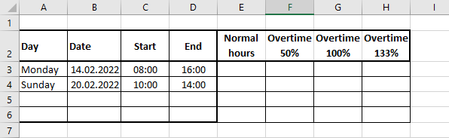
As long as the values in column C are below the max normal working hours (16:00), the table shows the correct values in the correct columns E, F, G and H.
But if i insert a starting time above the max value for normal working hours, the result of the formula is a negative time, showing ##### in column E.
And at the same time the result of the formula calculating the overtime 50% in column F is showing a incorrect value.
I would like to get the automatic results in the overtime columns when starting after 16:00 and the column for normal hours showing 0.
I apologize if i haven't been clear from the beginning of this interesting conversation....
An other question is: How can i implement the Saturday also as overtime 100%.
Greetings Jeroen.