Forum Discussion

chahineatallah
Nov 02, 2024Copper Contributor
Excel forms and VBA
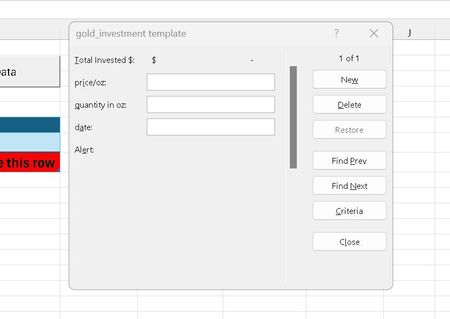
Hello Was trying to do a button, which will open excel form (feature in excel for data entry and tables) So basically when i run the macro , which opens shows this form, the form is not wo...

NikolinoDE
Nov 03, 2024Platinum Contributor
Below is a sample VBA code for the UserForm with basic data entry functionality.
Vba Code is untested backup your file first
' Code for the Submit Button on the UserForm
Private Sub btnSubmit_Click()
    Dim ws As Worksheet
    Dim emptyRow As Long

    ' Define the worksheet where data will be saved
    Set ws = ThisWorkbook.Sheets("InvestmentTable")

    ' Find the next empty row
    emptyRow = ws.Cells(ws.Rows.Count, 1).End(xlUp).Row + 1

    ' Transfer data from the form to the worksheet
    ws.Cells(emptyRow, 1).Value = Me.TextBox1.Value  ' Example: Investment Amount
    ws.Cells(emptyRow, 2).Value = Me.TextBox2.Value  ' Example: Investment Date
    ' Add additional fields as necessary

    ' Clear form fields after submission
    Me.TextBox1.Value = ""
    Me.TextBox2.Value = ""
    MsgBox "Data has been successfully entered.", vbInformation
End Sub

' Code to close the form
Private Sub btnClose_Click()
    Unload Me
End Sub
Display the UserForm through a Macro Button:
Create a macro to open the UserForm, which you can assign to a button on your worksheet.
Sub ShowInvestmentForm()
    InvestmentForm.Show
End Sub
This code is intended to serve as a starting point and should be adapted by you to suit your requirements.
My answers are voluntary and without guarantee!
Hope this will help you.