Forum Discussion

Excel Find not Working
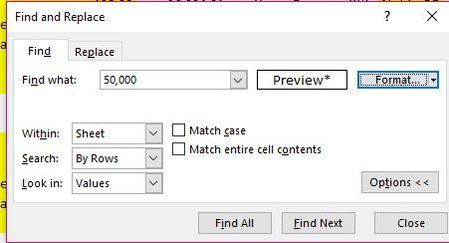

RichinMesa , you find number formatted exactly the same way as in Format option. Number is 50000, format as you define (number, or accounting, correct thousand separator and number of decimal points)
With this example
Find ignores cell A3 and selects C3 (same value but different format).

SergeiBaklan - thanks for your reply. It still doid not work. I tried what you said and added a ".00" to my 50,000 example. It matches the format exactly but does not find the value.
I tried another sample by using a new worksheet and two values like you did. At first it did not work like my earlier attempt. Then I tried to find 50,000 without the ".00" and out of the blue it worked! It also worked on my original worksheet. Maybe it was clicking the "thousands separator" in the find format that did it.
Thanks for your help.
- SergeiBaklanMay 07, 2019Diamond Contributor
RichinMesa , in Find what: bar it shall be the number without any formatting. Not 50,000 not 50000.00 Only 50000. If you don't add Format option, it finds any 50000, doesn't matter how it is formatted. If you add format options, it finds only 50000 formatted as you defined.
If you try to find 50,000 or 50000.00 it finds nothing. More exactly no one number - Excel will be finding text "50,000", not number.