Forum Discussion

CHofm
Apr 14, 2021Copper Contributor
Excel file with VBA code - ERROR
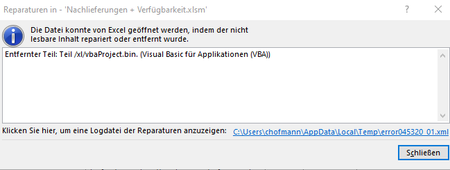
Hello everyone, I´ve got a problem with my excel file. There are 2 VBA codes included. Whenever I start the file by double klicking the file on the desktop, the following error occurs. ...

JKPieterse
Apr 14, 2021Silver Contributor
Are you able to share the file in question? Please remove sensitive information first.
 CHofmApr 14, 2021Copper Contributor
JKPieterse : thanks for your reply.
I´ve uploaded a Test-file with an empty macro. It doesn´t matter wheter there is a macro-code. Even if VBA is empty at all - there is always the same error. I think there might be some problems with excel or windows since I can open the excel file in the way I´ve already mentioned: Open an empty Excel file and then search for the needed file. That´s the weird stuff.
- JKPieterseApr 15, 2021Silver ContributorFOund this, perhaps it gives you some pointers?
https://answers.microsoft.com/en-us/msoffice/forum/msoffice_excel-mso_win10-mso_2010/removed-part-xlvbaprojectbin-part-visual-basic-for/ef249567-269c-40bd-9e06-fc8fef66f902
and
https://stackoverflow.com/questions/5124184/how-do-i-recover-this-vba-project-excel-error-message-removed-part-xl-vbapr