Forum Discussion

jishnuchandra1
Aug 07, 2021Copper Contributor
Excel date formatting issue automatically changing date value to month
I am having one issue such that changing my date field as month field! I have used format cell option and used custom format M/DD/YYYY and entered 01/08/2018. but that is changing to 08/01/2018! ...
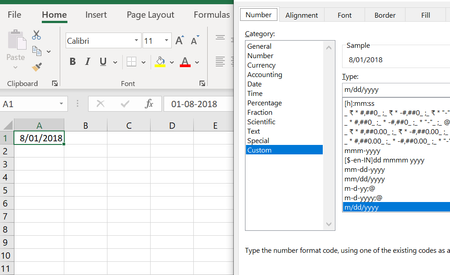
- Aug 07, 2021
You must always enter dates according to your system date format, regardless of how the cell is formatted.
I assume that your system date format is dd-mm-yyyy. If you enter 01/08/2018, Excel interprets it as the 1st of August, 2018, and shows 01-08-2018 in the formula bar.
Formatted as m/dd/yyyy, this is displayed as 8/01/2018 in the cell.
If you want to enter the 8th of January, 2018, you must enter it as 08/01/2018 or 8-1-18 or similar because of the dd-mm-yyyy system date format. You'll see 08-01-2018 in the formula bar.
Formatted as m/dd/yyyy, you'll see 1/08/2018 in the cell.


AlexBota80
Oct 14, 2026Copper Contributor
There is no a preformed format that I want. I want Day/Month/Year ( like this: 01/12/2026). How can I change it into thsi format?