Forum Discussion

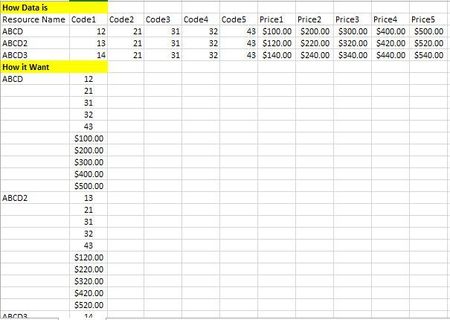
Excel data split from multiple column to row
- Jul 08, 2021
Here are the formulas in a version you can paste and fill down:
=IF(MOD(ROW()-ROW($D$7),COLUMNS($B$1:$K$4)),"",INDEX($A$1:$A$4,INT((ROW()-ROW($D$7))/COLUMNS($B$1:$K$4))+1,1))=INDEX($A$1:$K$4,INT((ROW()-ROW($D$7))/COLUMNS($B$1:$K$4))+1,MOD(ROW()-ROW($D$7),COLUMNS($B$1:$K$4))+2)you can either replace the ranges like $B$1:$K$4 with the correct range in each case or I would recommend replacing it with a named variable (e.g. DATA) then you create in the Name Manager under the Formula menu. BTW the $D$7 in these formulas are the first cell where the data will go so that ROW()-ROW($D$7) gives you a count.


Here are the formulas in a version you can paste and fill down:
=IF(MOD(ROW()-ROW($D$7),COLUMNS($B$1:$K$4)),"",INDEX($A$1:$A$4,INT((ROW()-ROW($D$7))/COLUMNS($B$1:$K$4))+1,1))=INDEX($A$1:$K$4,INT((ROW()-ROW($D$7))/COLUMNS($B$1:$K$4))+1,MOD(ROW()-ROW($D$7),COLUMNS($B$1:$K$4))+2)you can either replace the ranges like $B$1:$K$4 with the correct range in each case or I would recommend replacing it with a named variable (e.g. DATA) then you create in the Name Manager under the Formula menu. BTW the $D$7 in these formulas are the first cell where the data will go so that ROW()-ROW($D$7) gives you a count.
- Sumit_BhokareJul 13, 2021Brass Contributor
mtarler what needs to do if I want output like
- mtarlerJul 13, 2021Silver Contributor
Sumit_Bhokare If you can understand and use PQ as Lorenzo is helping you with, that is a great skill to have and very powerful and useful. If you want to modify the equations you just need to modify the ranges they point to. In attached I change the range for the 1st column to only include the "Code" section to determine the # of rows needed and then the Code and Price columns only point at those regions.
- LorenzoJul 13, 2021Silver Contributor
Not quite sure this is doable with the Power Query user interface only or it's going to be complex
See attached file with a possible option where I decomposed the steps with hopefully meaningful names
You'll see some steps are very similar. This means the query can we written differently. That would make sense if we were to deal with more than 2 sets of columns (Code, Price) but as you're new to this I kept things "simple"
- Sumit_BhokareJul 13, 2021Brass ContributorThank you!
