Forum Discussion

EXCEL Crashes while opening External Data connections workbook
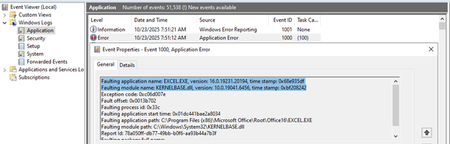

Yes, this is a known issue Excel Version 16.0.19231.20216, may consider below if automatic updates suspension is not an option:
1. Modify the COM Add-in behavior:
o If possible, delay or defer the external data connection until after the workbook is fully loaded.
o Consider wrapping the connection logic in error handling to catch and log exceptions before Excel crashes.
2. Use Office Insider or Beta Channels:
o Sometimes newer builds in the Insider or Beta channels contain fixes for recent regressions.
o You can switch to a different update channel using the Office Deployment Tool or Group Policy.
 GopalakrishnanDurairajNov 05, 2025Copper Contributor
Hi Kidd_Ip ,
Thanks for the reply.
Using the Office deployment tool, I upgraded to the latest release of Office 365 and tried to open the custom workbook. The problem remains unresolved in the newer version. Can you please confirm if this issue has been addressed and fixed in any of the latest releases?Meanwhile, I'll try to delay the external connection until the workbook loads completely.