Forum Discussion

pthongmak01
Aug 15, 2024Copper Contributor
Excel conditional formatting
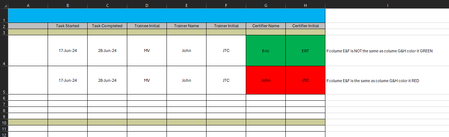
Please help with conditional formatting rules. In our unit the trainer can not be the same as the certifier. I manually colored it to what I wish to see. Thank you a TON in advance!!

pthongmak01
Aug 15, 2024Copper Contributor
Thank you so much for a quick response!
However; after trying out the new rules I forgot to mentioned the third line, please see the picture.
Also instead of selecting column G, starting from row 4, can I just select the entire row G for faster application? There are hundred of rows in the real excel and there are many excel sheets I need to apply this rule to.
Thank you!!!

m_tarler
Aug 15, 2024Silver Contributor
in that case ignore my comment above.
yes the formula can be made to ignore the first 3 rows but you will have to use row 1 in the formula so something like = (G1<>E1)*(ROW(G1)>3)*(G1<>"")
but my question is if both G and H should be green/red based on G alone or not. For example could you have G4=E4 but H4<>F4 and therefore want the cells to be RED and GREEN respectively? If so the 2 conditional formatting formulas are
Highlight entired columns G:H then
for GREEN:
= (G1<>E1)*(ROW(G1)>3)*(G1<>"")
for RED:
= (G1=E1)*(ROW(G1)>3)*(G1<>"")
yes the formula can be made to ignore the first 3 rows but you will have to use row 1 in the formula so something like = (G1<>E1)*(ROW(G1)>3)*(G1<>"")
but my question is if both G and H should be green/red based on G alone or not. For example could you have G4=E4 but H4<>F4 and therefore want the cells to be RED and GREEN respectively? If so the 2 conditional formatting formulas are
Highlight entired columns G:H then
for GREEN:
= (G1<>E1)*(ROW(G1)>3)*(G1<>"")
for RED:
= (G1=E1)*(ROW(G1)>3)*(G1<>"")
- pthongmak01Aug 15, 2024Copper ContributorThank you for the response,
Yes we can make G and H be green/red based on G.- m_tarlerAug 15, 2024Silver Contributorif you want both columns G and H to depend on ONLY col G vs col E then
Highlight entired columns G:H then
for GREEN:
= ($G1<>$E1)*(ROW(G1)>3)*($G1<>"")
for RED:
= ($G1=$E1)*(ROW(G1)>3)*($G1<>"")
as you can see the only change was adding those $ signs.