Forum Discussion

Excel Compare Data
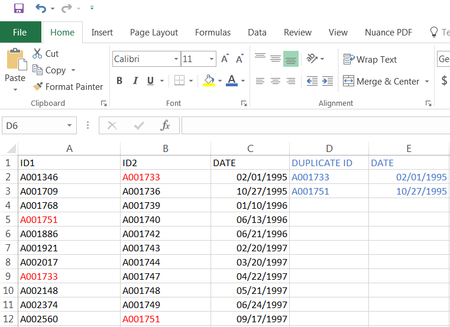
 Nov 30, 2017
Arnold,
Step 1
Put this formula in cell D2 and fill it down:
=IF(ISNUMBER(MATCH(B2,$A$2:$A$200,0)),B2,"")
Don't forget to change this range $A$2:$A$200 to your existing range.
Step 2
Put this formula in cell E2 and fill it down:
=IF(D2<>"",C2,"")
Step 3
Sort column E from A to Z, or column D from Z to A, to move the duplicate values to the top.
Arnold,
Step 1
Put this formula in cell D2 and fill it down:
=IF(ISNUMBER(MATCH(B2,$A$2:$A$200,0)),B2,"")
Don't forget to change this range $A$2:$A$200 to your existing range.
Step 2
Put this formula in cell E2 and fill it down:
=IF(D2<>"",C2,"")
Step 3
Sort column E from A to Z, or column D from Z to A, to move the duplicate values to the top.

Hello Haytham,
I applied your formula on a new spread sheet but I am getting a blank result. How do I run the formula? This is what I have so far:
=IF(ISNUMBER(MATCH(B2,$A$2:$A$1538,0)),B2,"") In Column D. I just hit Enter and nothing came out.
=IF(D2<>"",C2,"") In Column E. I also hit enter and nothing came out.
- Haytham AmairahDec 01, 2017Silver Contributor
After you hit enter drag each formula down by using the https://support.office.com/en-us/article/Fill-a-formula-down-into-adjacent-cells-041edfe2-05bc-40e6-b933-ef48c3f308c6
Then sort column E from A to Z, or column D from Z to A, to move the duplicate values to the top.
- Arnold LopezDec 01, 2017Copper Contributor
Okay, I have to hard type the formula and not just copy your formula and paste it. Also, I dragged each formula down and I got the result which is cool. The only problem I am having now is when I'm sorting it, either in Column E or D, the dates are off? I am comparing the dates from the original and somehow some dates are showing up on ID 2 where there shouldn't be any date at all.
For example:
ID 2 (column 2) one ID has no date next to it, but after doing the sorting in column E (dates), the ID with no date will have a date. I think I will not sort it for now until I get more help from you. So far, I got the result that I need. It's the sorting now that I am having problem with, thanks.
- Haytham AmairahDec 01, 2017Silver Contributor
I guess that the date that you got is something like this: 01/00/1900
If you have blank cells in the column C (DATE column), then replace the below formula in column E:
=IF(D2<>"",C2,"")
With this:
=IF(C2<>"",IF(D2<>"",C2,""),"")
After that, sort column D from Z to A.