Forum Discussion

JoostvdH
Nov 11, 2024Copper Contributor
Excel combination of tables
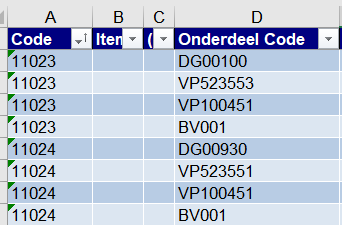
Hello, I'm trying to figure out the best way to get a table with information from two seperate tables. In the first table I got article numbers in column A. Each article consists of multiple comp...
- Nov 11, 2024
You may use Power Query to merge tables
like
let
    Source = Table.NestedJoin(
        Table1, {"Onderdeel Code"},
        Table2, {"Deeg"}, "Table2",
        JoinKind.LeftOuter),
    ExpandTable2 = Table.ExpandTableColumn(
        Source,
        "Table2",
        {"Code"}, {"Code.1"}),
    AddComponent = Table.AddColumn(
        ExpandTable2,
        "Component",
        each
            if [Code.1] = null
            then [Onderdeel Code] else
            [Code.1]
    ),
    SelectColumns = Table.SelectColumns(
        AddComponent,
        {"Code", "Component"})
in
    SelectColumns
Please check attached.

SergeiBaklan
Nov 11, 2024Diamond Contributor
You may use Power Query to merge tables
like
let
    Source = Table.NestedJoin(
        Table1, {"Onderdeel Code"},
        Table2, {"Deeg"}, "Table2",
        JoinKind.LeftOuter),
    ExpandTable2 = Table.ExpandTableColumn(
        Source,
        "Table2",
        {"Code"}, {"Code.1"}),
    AddComponent = Table.AddColumn(
        ExpandTable2,
        "Component",
        each
            if [Code.1] = null
            then [Onderdeel Code] else
            [Code.1]
    ),
    SelectColumns = Table.SelectColumns(
        AddComponent,
        {"Code", "Component"})
in
    SelectColumns
Please check attached.