Forum Discussion

Excel changing numbers, removes the decimal point.

Mark, how exactly "same issue" looks?
- you open new workbook
- type numbers like 12.345 into the cells from top to down
- in rows from 1 to 12 (or so) Excel shows as it is entered, i.e. 12.345
- in next rows starting from #13 Excel shows 12345 ignoring decimal point
Or that's another behaviour?

SergeiBaklan Sergei, et al, yes you describe the issue correctly above.
I tried making a new worksheet. Typed in 12.212 as an example of the data I want to enter. Excel shows it as 12212. No decimal.
I went to the Control Panel and checked the region/language, re-entered these as USA and English. I also when to File-Options-Advanced-Editing Options and re-entered the separators as a "period" for the decimal separator and a "comma" for thousands separator. Spreadsheet still only will show 12212.
Attached is today's test. Interestingly under the second column (Miles) Excel takes my enter of 250 and turns it into 0.25????
As it stands Excel is useless for such a simple set of calculations.
- SergeiBaklanMay 30, 2020Diamond Contributor
That is strange. You have also currency format with two dots, currency aligned to left
Not sure if that you applied such formats or something is wrong in Excel behaviour. Could we make clean test please?
1) Nothing change in Windows settings, just check and record which they are
Win+R control international Additional settings
2) Open New Excel file, do nothing but check this setting
is it set or not and if set when how
3) Is this setting unchecked or not and if unchecked which separators are defined
4) Stay on cell A1, when B1, Ctrl+1 and check which format is applied (General or not)
5) Enter
into A1 12.212
into B1 250
into C1 =A1*B1
What we will see in all 3 cells?
- MarkMarkwjNov 06, 2020Copper Contributor
SergeiBaklan Hi Sergei as I wrote earlier: Sorry I sort of gave up on this and haven't checked in oh...5 month...
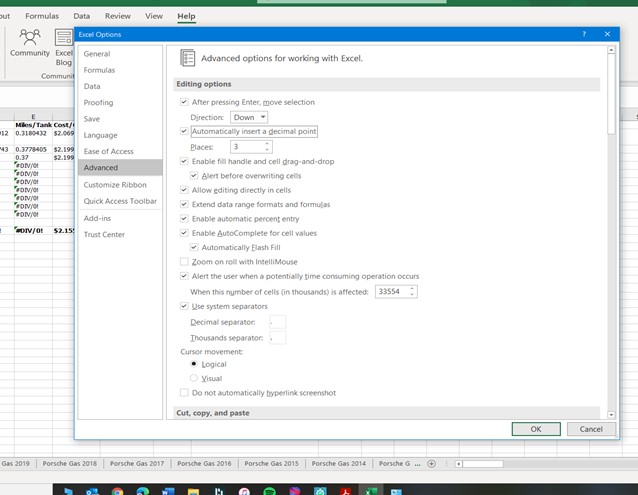
Followed your steps below: still no joy the screen shots of the control panle and the excel options posted on JB's post
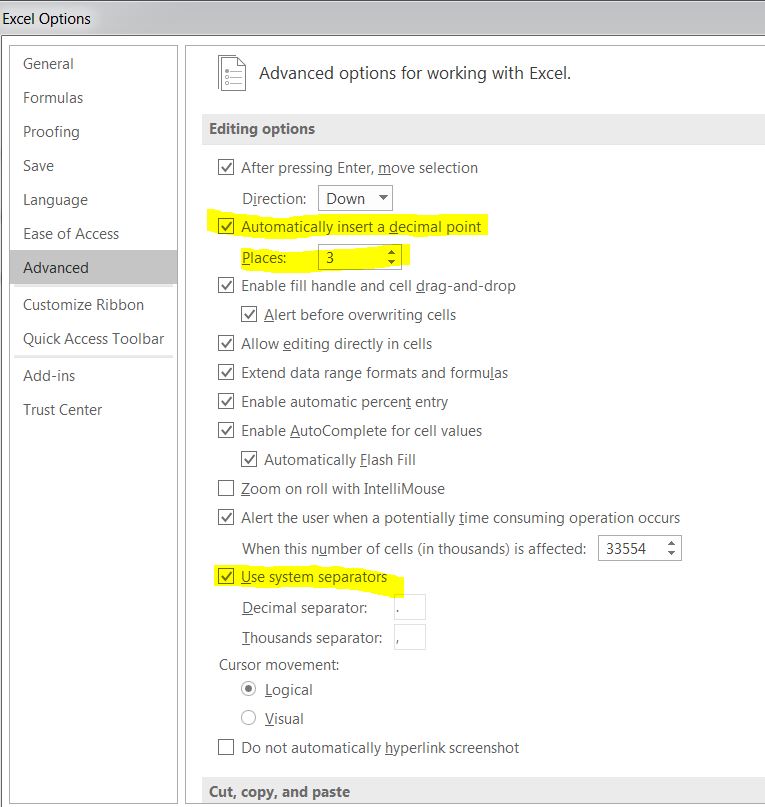
 JMB17Nov 14, 2020Bronze ContributorFor one thing, you need to uncheck "Automatically insert a decimal point" under Excel's advanced options. That will cause 250 to become 0.250.
- JMB17May 30, 2020Bronze Contributor
Would you mind posting screenshots of your Excel editing options (File\Options\Advanced - editing section) and your machines region settings (Start\Settings\Time and Language\Region\Additional date, time & region settings\Change date, time, or number formats\Additional settings).
Changing the region formats to U.S. / English is not what I was talking about. You have to go further into the additional settings to see what the system group separator is.
I attached screenshots of the settings I'm talking about. When open your spreadsheet, I can't duplicate your issue unless I change application settings or system settings. It just doesn't seem like a problem with your workbook because it works fine for me.
- MarkMarkwjNov 06, 2020Copper Contributor
JMB17 Sorry I sort of gave up on this and haven't checked in oh...5 month...
see attached: I think I checked these before still no joy...thanks for all the help and attention