Forum Discussion

Excel Challenge
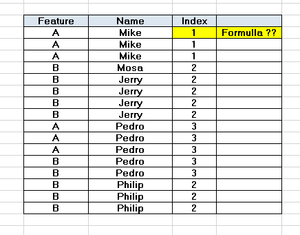
- Jul 07, 2020
=MMULT(--(COUNTIFS($B$2:$B$17,B2,$A$2:$A$17,{"A","B"})>0),{1;2})


Detlef_Lewin that is a clever solution
mathetes mmulti() stands for matrix multiply which goes back to linear algebra days.
I started to try and explain it here but you would be much better served with a website designed to teach it like https://www.google.com/url?sa=t&rct=j&q=&esrc=s&source=web&cd=&cad=rja&uact=8&ved=2ahUKEwj2y6HcmrzqAhUFLs0KHfvBDbUQFjAAegQIAhAB&url=https%3A%2F%2Fwww.mathsisfun.com%2Falgebra%2Fmatrix-multiplying.html&usg=AOvVaw2H0BMrqG1AOypxo5VF-pz8

Thanks for that link. I'm printing the page now for careful study.....and then I'll keep my eyes open for opportunities to apply MMULTI. It's in the using that it'll really (finally) make sense.
 JMB17Jul 08, 2020Bronze Contributor
One use can be to create an array of subtotals for use in an array formula or lookup formula where, for whatever reason, you don't/can't have a subtotal helper column. So, if you had numbers in A1:A10, and entered this in B1:B10, you would get a subtotal array (credit to Harlan Grove):
=MMULT(--(ROW(A1:A10)>=TRANSPOSE(ROW(A1:A10))),A1:A10)
I'm not an expert on it's use, but I've used it in situations where I needed an OR criteria in an array calculation, but it had to be condensed into a single dimension array (instead of leaving it 2D and multiplying it out-sometimes the other parts of the formula were also OR criteria with different dimensions and the normal array multiplication wouldn't work and MMULT was more compact than the usual array addition I would use for OR).
Here's an example file of using mmult on a 2D data table with multiple OR criteria in both dimensions.